Camera and object tracking using HTC Vive

Hi, I'm currently testing tracking in Aximmetry and I've encountered a few problems. (My setup is 1 Aximmetry Broadcast SE and 1 Professional SE. Scene is made in c4d and imported as fbx).

1. Remote renderers. Is multi-machine setup possible in tracking environment? While I was using virtual cameras remote rendereres worked fine with no problems. When I switched to tracked - no remote cameras. I tried setting up everything like I did with virtual cameras (allow virtuals, remote 1, etc.)? but only thing I got was aximmetry calibration test pattern.

2. When panning camera static objects are quite jittery (dejitter is turned on). Its not quite like jitter, its like camera picture is jumping a few frames. Can it be fixed with aximmetry settings or its just Vive thing? Also i noticed that when panning and tilting my objects doesnt stay in right place in relation to scene. When panning left my object is kind of in right place, but panning in other direction and it moves quite far.

3. Objects tracking. Another thing that I wanted to test if it is possible to move objects inside scene using tracking data from Vive tracker. I added camera tracker inside scene node and passed transformation to transformation input pin of my object. That seemed to work, but not quite well. It tracked movement but anchor point of the object was not aligned with tracker. I didnt find any solution how to move this point or offset transformation data to make it allign. Is it even possible? 


Thanks in advance for any info regarding these questions. I can send video later if needed.

   Fominus

コメント

Rain_law
  -  

You can look for a software for lens calibration

Eifert@Aximmetry
  -  

Hi Fominus,

1.

This is probably caused by HTC Vive being connected to only one computer and the tracking data is not shared across the network. In the case of most tracking systems, the tracking data is shared across the network as they use UDP and TCP network protocols instead of one USB connection.
However, you don't have to worry cause Aximmetry can forward the HTC tracking data to your remote renderers. You just need to enable Tracking Forward:


2.

If panning and tilting the camera and the objects don't stay in right place in relation to the scene, that means something is off in the tracking setting or calibration.

In cases like yours where the tracking system doesn't transmit zoom information, it is usually the zoom setting that is wrong. Like, you have to find the right zoom level in Aximmetry that is the same as in your camera's lens. If you are using Aximmetry's Camera Calibrator, then you can only use fixed FoV and after calibration, you can not change the zoom when using the calibration profile.
If you have a zoom encoder along with the HTC Vive, then of course you don't have this kind of trouble.

It is hard to tell what is causing jitter and picture jumping without seeing it. It is probably not related to incorrect tracking calibration. If you can post a video of it (for example shared on youtube in private) that can help a lot in figuring out what is the source of this problem.


3.

You can offset tracking data like this. Using a second Scene Node and changing its Transformation.

However, I am not sure if you just wanted to offset the object or if it was tracked also wrongly. If it is also tracked wrongly, then maybe something is wrong in the Vive setup. Did you complete the Room setup? https://aximmetry.com/learn/tutorials/for-aximmetry-de-users/experimenting-with-htc-vive-camera-tracking-using-unreal-scene/

Warmest regards,

Stefan Reck
  -  

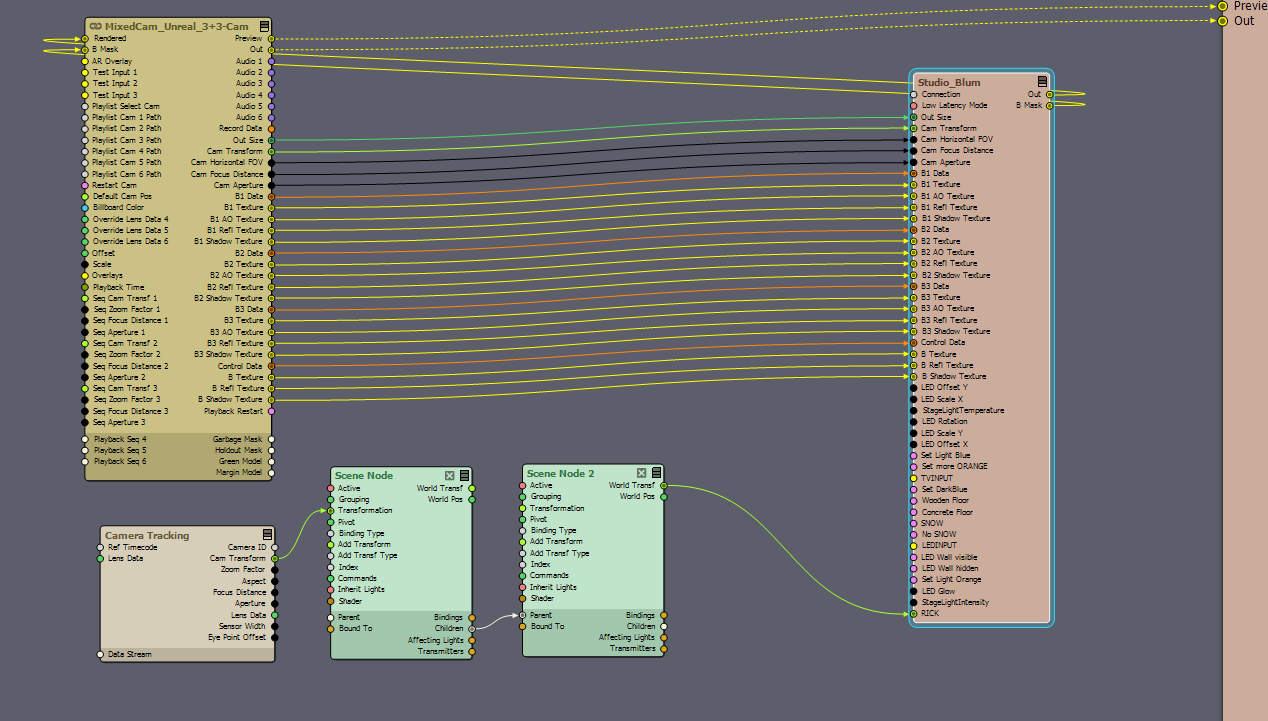
Going on from this: We run Vive Trackers over EZTrack boxes that feed FreeD into 2026.2.0. For object tracking I simply plugged in an additional Tracker receiver, calibrated its tracker to the same origin as the cameras and let it feed FreeD into a camera tracking module in Aximmetry. The tracking data works fine, if I put the tracker down on the origin it properly reports a transformation of (nearly) zero. So I take this transformation, feed it through two scene nodes in a parent/children config to be able to offset things if needed and feed that into the blueprint input pin of a movable unreal object.

So far so good. But I can't really figure out how to align the object with the tracker properly. See example video below. The object appears to be properly centered above the tracker as it rotates cleanly around its own axis. But it´s not in the same position, and if I try to compensate for this in the scene nodes it will start rotating around the tracker instead. What am I missing here? 

https://harmonicsound.wetransfer.com/downloads/9fdddb0efd5281f43150033dd7104f0c20260715132505/feabec438d61146de329b4d7a4252a8b20260715132735/f4a2c9


Stefan Reck
  -  

So I´ve dug a bit deeper around various parameters:


- The pivot point of the unreal object is centered in its base.

- The amount of how far off the virtual object is from the position of the tracker is dependent on the current focal length/zoom position of the camera and also its position in relation to the set. However trying to compensate for this by using a lens calibration file does not work - it offsets the center of the tracker from the pivot point of the object the same way as putting in a translation in a scene node does.

- Zeroing out a tracked camera's origin translation manually puts the object pretty close to the tracker, but it still doesn´t track spatially correct. Also that isn´t practical for all our cameras; if we don´t use the marker-based origin detection the perspective of the set always looks slightly off although the origin of the tracking system itself is set correctly to the same point in EZTrack.

- tying the camera billboard to the object tracker with the talent tracking input makes the error in perspective less noticable but there is still a lateral offset I can´t get rid off...


Patrik@Aximmetry
  -  

Hello Stefan,

Could you please show us your Aximmetry Scene Node setup?
Is the asset parented to any other asset or is it a separate object in UE?


Thank you,
Patrik


Stefan Reck
  -  

Hello Patrik,

Here is a screenshot of the Flow. The asset is built as a separate, movable object in UE. The UE blueprint is built according to this:

https://aximmetry.com/learn/virtual-production-workflow/obtaining-graphics-and-virtual-assets/creating-content-in-ax-scene-editor/additional-control-with-blueprints/#get-aximmetry-transformation. 


Camera and object tracking using HTC Vive

I have also found this information on the subject, but I don´t even know if this is still relevant in 2026.2.0

https://my.aximmetry.com/post/3024-camera-calibrator-nodal-offset-to-unreal