Hello, I’m having issues with multi‑machine LED rendering. My camera FreeD data is sent from an Umoco robotic arm, which can only transmit to a single IP address. I want to use Tracking FWD to forward the FreeD data, but it’s not working.
Set the host IP for transmission

Render machine IP settings
Hi originalforce,
First, let's confirm that your tracking system is set up correctly.


Once the tracking device is set up on the control machine (the machine running Composer), the fastest way to check whether tracking data actually reaches Aximmetry is the Camera Tracking module. Select your tracking device in the Device pin:
Then peek the Cam Transform output pin, either by holding Ctrl while hovering over it or by using the Transformation Peeker:
Moving your tracked camera should now change the transformation values.
If nothing changes, the tracking data isn't reaching Aximmetry. In that case, please check the following: the tracking device is turned on and transmitting, the IP address and port number are correct, and the right adapter is selected to receive the data.
If you encounter problems, you can read our documentation as it walks you through adding a Free-D tracking device:
https://aximmetry.com/learn/virtual-production-workflow/tracking/setting-up-specific-tracking-systems/setting-up-free-d-systems/#setting-up-freed-in-aximmetry
Next, make sure the two machines are connected to each other. Open the Multi-Machine Manager on the control machine — it's under the View menu, or press Alt+M. The remote machine should show a Running status here, which means the Renderer on the remote machine is currently running:

If doesn’t say Running, restart the Renderer on the remote machine. Should the problem persist, our documentation covers the full Multi-Machine setup:
https://aximmetry.com/learn/virtual-production-workflow/multi-machine-environment/introduction-to-multi-machine-environment/
For forwarding tracking data between machines, Tracking Forward needs to be switched On (on the control machine). On your screenshot, the Tracking Forward switch appears to be disabled, have you tried turning it on?
You can learn more about the Tracking Forward and Tracking Fwd Port parameters in our documentation:
https://aximmetry.com/learn/virtual-production-workflow/led-wall-production/setting-up-the-inputs/tracked-camera-inputs/#tracking-forward
To confirm that the data really is forwarded to the remote machine, open the Peeker on the remote machine's Renderer:


Then, on the control machine, go to the LEDWallCam compound and peek the Control Data pin:
The remote machine's Renderer Peeker should now show the Cam Transform data changing in real time as you move the camera — just as it does on the control machine:
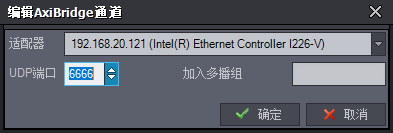
Tracking Fwd Aux IP and the AxiBridge device are only needed when you want to send the data to a device/machine outside a Multi-Machine environment. In a Multi-Machine LED wall setup, the workflow above should resolve the issue you ran into.
Warmest regards,
Adam