iin our workflow it is crucial, that we can import lut files and/or ocio files, this seems very complicated now, do you plan an easy import soon?
lut ocio
Comments
t0rn4d0
-
Thank you very much.
i applied the color mapper inside the Mixed cam module since i only want the cam to be affected by the lut and as far as I understand it will be lost after an update.
Best regards
zeno
Patrik@Aximmetry
-
Hello t0rn4d0,
You can save your modified camera compound, but ultimately, yes, you will need to add the modification to the new default camera after an update.
More on this here: https://aximmetry.com/learn/virtual-production-workflow/scripting-in-aximmetry/flow-editor/compound/?srsltid=AfmBOor2gr9SnZzhVg0wBD_VaUEuSqaPDPvAsoJ33jzt6iIHtVIjLM3b#working-with-compounds-from-aximmetry-library
I've added this to our feature requests list.
Best Regards,
Patrik
Hello t0rn4d0,
Using a LUT file in Aximmetry is actually pretty simple, all you need is the Color Mapper module set up like this:
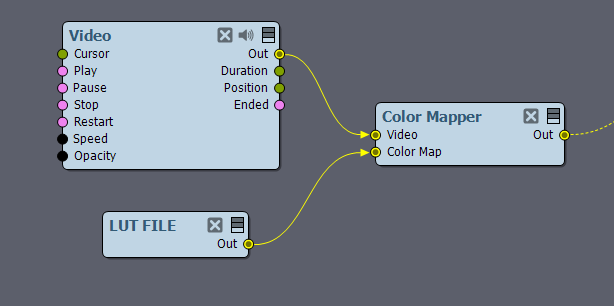
You can replace the Video module with any of your renders.
OCIO config files are currently not supported.
LUT generation for LED walls is a completely automated process.
https://aximmetry.com/learn/virtual-production-workflow/led-wall-production/setting-up-the-digital-extension/lut-measure/
If you could give a more detailed example of why you find it complicated, maybe we can give you a simpler solution.
Best Regards,
Patrik