Hi everyone,
I am planning a project where I shoot talent on a green screen, composite it with a virtual set inside Aximmetry in post-production, and then use that composited footage as a material in Adobe Premiere Pro.
I am looking for the best workflow and settings that meet the following requirements:
Use in Premiere Pro: The final composited video from Aximmetry will be imported into Premiere Pro for further editing/use.
Exact Matching Duration: The duration of the exported composited video must perfectly match the original recorded green screen footage (frame-for-frame).
Maximum Image Quality: I need to maintain the highest possible video quality when exporting from Aximmetry (ideally using high-quality codecs like ProRes or DNxHR to avoid heavy compression).
Could anyone guide me on how to set up the Video Player and Video Recorder modules in Aximmetry to achieve this smoothly without missing any frames?
I am using Aximmetry DE (Version: 2024.3.0).
Note: This message was translated from Japanese into English using a translation tool. I apologize for any unnatural phrasing.
Thank you in advance!
Hi,
Please find our detailed documentation about video recording here: https://aximmetry.com/learn/virtual-production-workflow/setting-up-inputs-outputs-for-virtual-production/video/recording/video-recording-and-image-capturing/
Additionally, we suggest using a Sequencer to play the video as shown here:
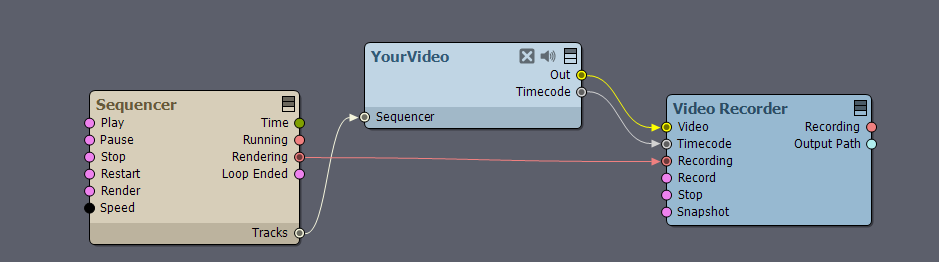
Utilizing its Render feature to record exactly the same number of frames as in the original video: https://aximmetry.com/learn/virtual-production-workflow/scripting-in-aximmetry/sequencing/sequencer-and-sequence-editor/#30-render
You can read about supported video formats here: https://aximmetry.com/learn/virtual-production-workflow/setting-up-inputs-outputs-for-virtual-production/supported-file-formats-encoders-and-decoders/#video
If you are running Aximmetry in playback mode, please take a look at the following documentation: https://aximmetry.com/learn/virtual-production-workflow/setting-up-inputs-outputs-for-virtual-production/video/recording/how-to-record-camera-tracking-data/#playback
Best Regards,
Patrik