When using the OpenAI_Text-ChatGPT compound (Aximmetry 2026.2.0) with a third-party OpenAI-compatible proxy (PackyAPI), the system fails to output text even when the API request is technically successful and tokens are consumed.
my Issues
Protocol Mismatch (Legacy vs. Chat): The factory compound defaults to the legacy /completions endpoint for certain model families, resulting in the error: "field messages is required".
Workaround: I enabled Raw JSON Override with a structured Chat message array, which successfully bypassed this error.
The "Null Content" & Token Consumption Paradox: Even with Status 200 and confirmed token usage (e.g., completion_tokens: 23), the Response Text returns {"content": null}.
Analysis: Modern models (like GPT-5.2/5.5) often return the actual answer in a reasoning_content field instead of the standard content field. The current Aximmetry compound appears to only parse the choices[0].message.content path.
Forced Streaming Behavior: Despite setting "stream": false in the Raw JSON, the proxy often returns chat.completion.chunk (SSE stream). Aximmetry's compound seems unable to aggregate these chunks into a single string when the "stream" parameter is overridden or ignored by the proxy's server-side settings.
Questions
1.Custom JSON Parsing: Is there a way to modify the compound's internal parser to look for reasoning_content or choices[0].text without breaking the entire linked compound?
2.Base URL & Stream Handling: How can we force the compound to handle non-standard streaming responses from proxies that don't strictly adhere to the stream: false flag?
3.Best Practice for Proxies: Does Aximmetry recommend using the HTTP Request module (single node) as a replacement for the OpenAI_Text-ChatGPT compound when dealing with third-party providers to ensure full control over the JSON structure?
Hi,
The OpenAI compounds were designed for the OpenAI API. The OpenAI_Text-ChatGPT compound uses the Responses API endpoint, https://api.openai.com/v1/responses, rather than the Chat Completions API.
The Responses API is the newer OpenAI API, and similar response formats are becoming more common. Because of this, the compound may work with PackyAPI to some extent. However, it was not specifically designed for third-party APIs, at least not yet.
From what you described, I think the main issue is that you are trying to parse a Chat Completions-style response rather than a Responses API response. The path choices[0].message.content belongs to the Chat Completions response format. You can likely fix most of your issues just by changing the API Url to https://www.packyapi.com/v1/responses in what you have already done.
Also, the compound does not support streaming responses, including streamed reasoning snippets. It only parses the final response.
That said, you can probably modify the compound to work with PackyAPI, no matter what API it is. Aximmetry 2026.2.0 includes several improvements and new modules that make working with APIs like this easier.
Below is a general overview of how the OpnAI_Text-ChatGPT compound works and how you could adapt it for another API.
Inside [Common]:Compounds\AI\OpenAI_Text-ChatGPT.xcomp, there is only one linked compound:
[Common]:Compounds\AI\Elements\OpenAI_ModelList.xcomp
This linked compound is responsible only for receiving the list of available OpenAI models and setting the OpenAI model.
The ChatGPT Request compound inside [Common]:Compounds\AI\OpenAI_Text-ChatGPT.xcomp is not a linked compound. It is a simple compound, meaning it is only a group of modules inside the main compound and is not saved as its own .xcomp file.
I recommend copying [Common]:Compounds\AI\OpenAI_Text-ChatGPT.xcomp and using the copy as the basis for your own PackyAPI version. After editing the copied version, you can use it in other projects or compounds as a linked compound. Or even during edits, you can use it in other compounds to instantly test your changes.
More information about linked compounds is available here:
https://aximmetry.com/learn/virtual-production-workflow/scripting-in-aximmetry/flow-editor/compound/#linked-compound
In the copied compound, first disconnect the Api Url and Model pins, then set them manually to the API endpoint and AI model you are using with PackyAPI. The endpoint is probably: https://www.packyapi.com/v1/responses
After saving the modified compound and setting your API key in a compound that contains it, you should already be able to see the returned data on the Raw Response pin when you trigger Send.
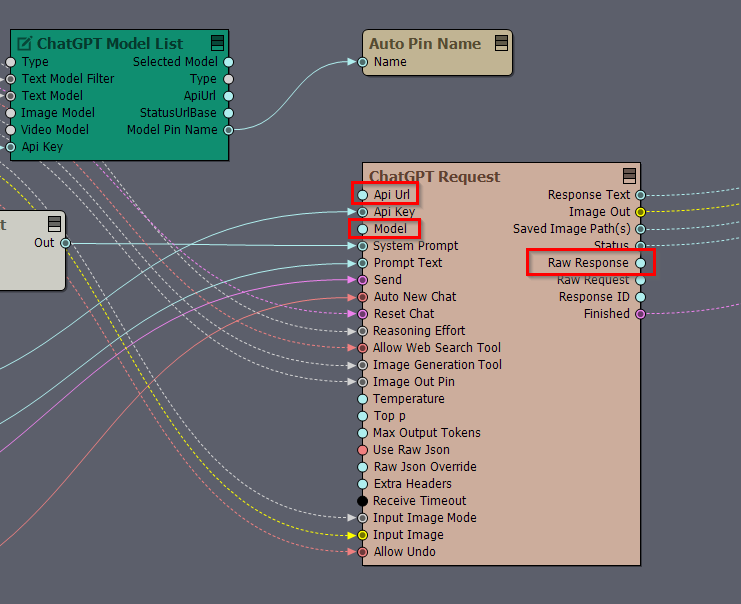
To inspect the response, connect a Text Exporter module to the Raw Response pin and save the returned text to a file. Then open the file in your preferred code or text editor and check which fields you need to parse.
Once you know the structure of the returned JSON, you can update the parsing logic inside the ChatGPT Request compound. Most of the parsing is done in the Output Parser array compound.
There is a comment inside the compound that shows the expected structure. For text output, the parser expects a Responses API structure like this:
{
"output": [
{
"type": "message",
"role": "assistant",
"content": [
{
"type": "output_text",
"text": "..."
}
]
}
]
}
This is a Responses API response format. It is not the same as the Chat Completions format, where the text is usually found through a path such as choices[0].message.content instead of output[0]....
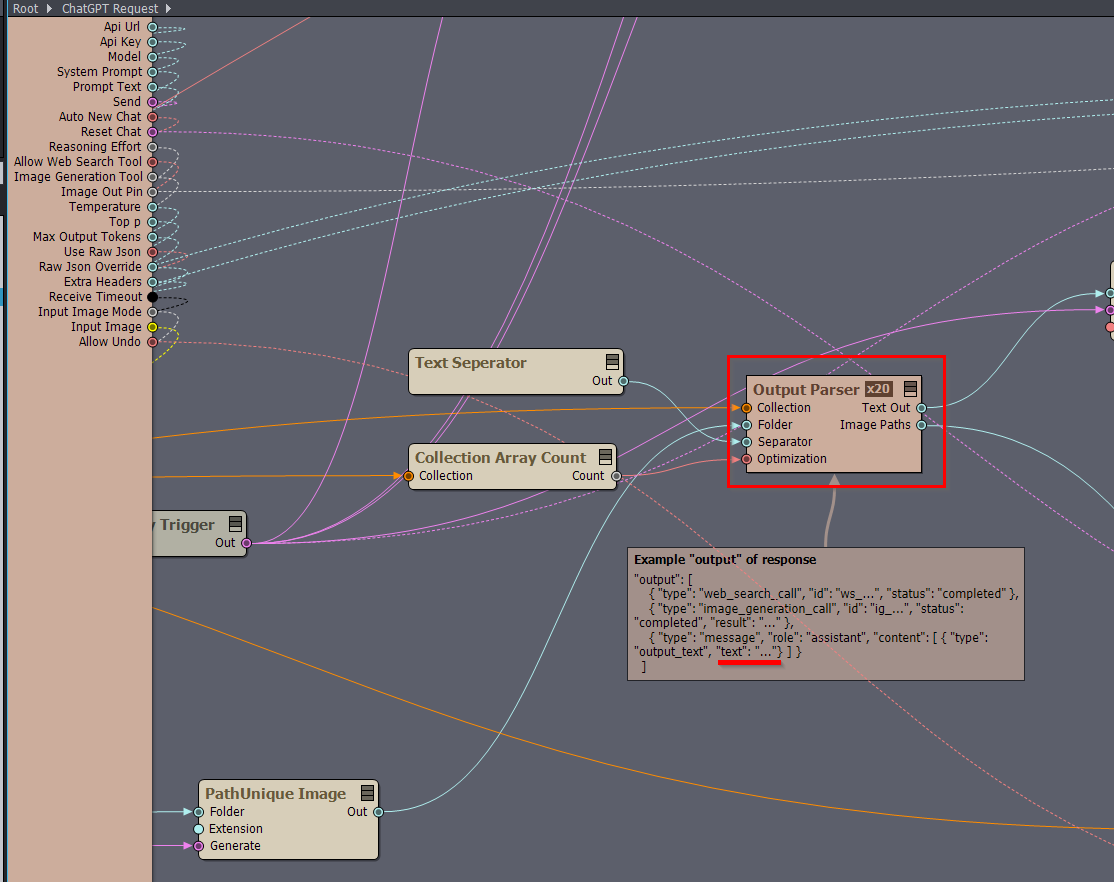
The JSON response is converted into Aximmetry’s Collection pin format, and most of the parsing is done from there. More information about collections is available here:https://aximmetry.com/learn/virtual-production-workflow/scripting-in-aximmetry/flow-editor/collection-for-databases/
You can use the Collection modules to extract the text you need. Since Output Parser is an array compound, it can process more than one text item if the response contains multiple text outputs.
More information about array compounds is available here:
https://aximmetry.com/learn/virtual-production-workflow/scripting-in-aximmetry/flow-editor/compound/#array-compound
I have a few questions that may help narrow this down:
If it only works when Use Raw Json is turned on, PackyAPI probably expects a different request structure from the OpenAI Responses API, or it may not support some parameters that the compound normally sends, such as tool-related parameters. These parameters probably also differ from what is supported by the Chat Completions API.
Warmest regards,