Hello,
I have a problem that's driving me almost to despair.
I have a green screen room with two PTZ cameras (Panasonic AW 150) with tracking signals.
The goal is to create a room with a counter in front of a wall. So I built a real counter and draped a green molton fabric over it.
My problem is that I can't align the edge of the counter precisely with the bottom of the camera image.
Therefore, I wanted to convert the counter into an AR element that would then be positioned in front of the camera image and cover the existing counter.
I've read all the available tutorials several times, but I can't get the counter to appear in front of the camera image and cover it.
I added the tag "AximmetryAR" to the counter actor, but when you open the project, the counter isn't displayed at all – it is, however, without this tag.
I'm also unsure which connections I need to make in Aximmetry, because when I connect AR Out with AR Rendered, the entire image disappears and only the counter is displayed.
I also need this process for a bar chart behind which a speaker is supposed to move.
I am using Aximmetry version 2025.3.0 with Unreal Editor 5.6.1 und der Broadcast Version.
And i Use the TrackedCam+AR_Unreal_3-Cam
Maybe you can help me.
kind regards
Andreas
in this Link there is the compressed Projekt (Ue + Axi)
https://nx13234.your-storageshare.de/s/ZmbZaNX2wcHdLeQ
154
Hi,
You need to connect the AR Out pin to the AR Rendered pin.
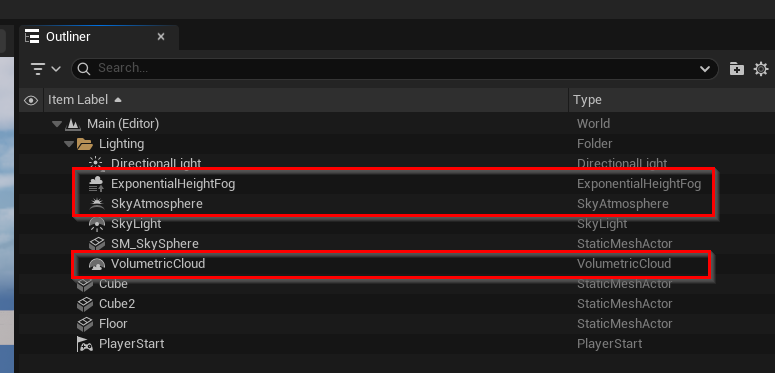
The problem is that certain Unreal features can also show up in the AR render, and they can cover or interfere with the rest of the scene. You should delete these features:
You can find more information about this here: https://aximmetry.com/learn/virtual-production-workflow/ar-production/unreal-scene-setup-ar/#fog
Also, are you sure the +AR feature is necessary in this case? The Green + AR setups are meant to be used together with Window Mask Mode:
https://aximmetry.com/learn/virtual-production-workflow/green-screen-production/tracked-camera-workflow/studio-control-panel/#mask-modes
Is your counter a 3D object, or are you capturing it live in the studio? I am not completely sure how your setup is built.
If this is only for the bar chart, then you definitely should not use the +AR camera.
Warmest regards,