The Aximmetry camera cut is quite abrupt in CUT. How can we achieve a fader or black-out transition? Please answer, thank you
The Aximmetry camera switch is quite abrupt in CUT. How can we achieve a fader or black-out transition?
Comments
Stefan Reck
-
This sounds very interesting for solving our completely unrelated problems with Unreal being slow to render certain surfaces that are lit using Lumen. How would that look in practice?
JohanF
-
@Stefan: what it would look like? You mean visually or how to set it up? It’s just an animated curve played in both directions. If the curve from full bright to full black takes 1 second, you would delay the camera switch with one second but trigger the animation the same time you click the camera switch. It’s not a workable, general solution. Multiple workstations and external switching is the way to go if you need real-time UE5 rendering for all cameras.
Eifert@Aximmetry
-
Hi,
You could try out something simple like this to create a “dip to black” fade out and then in.
The logic holds the last frame from the previous camera while the screen fades out to black, and Unreal switches camera meanwhile. Once the fade is complete, it releases the held frame so the new camera view becomes visible when it fades back in: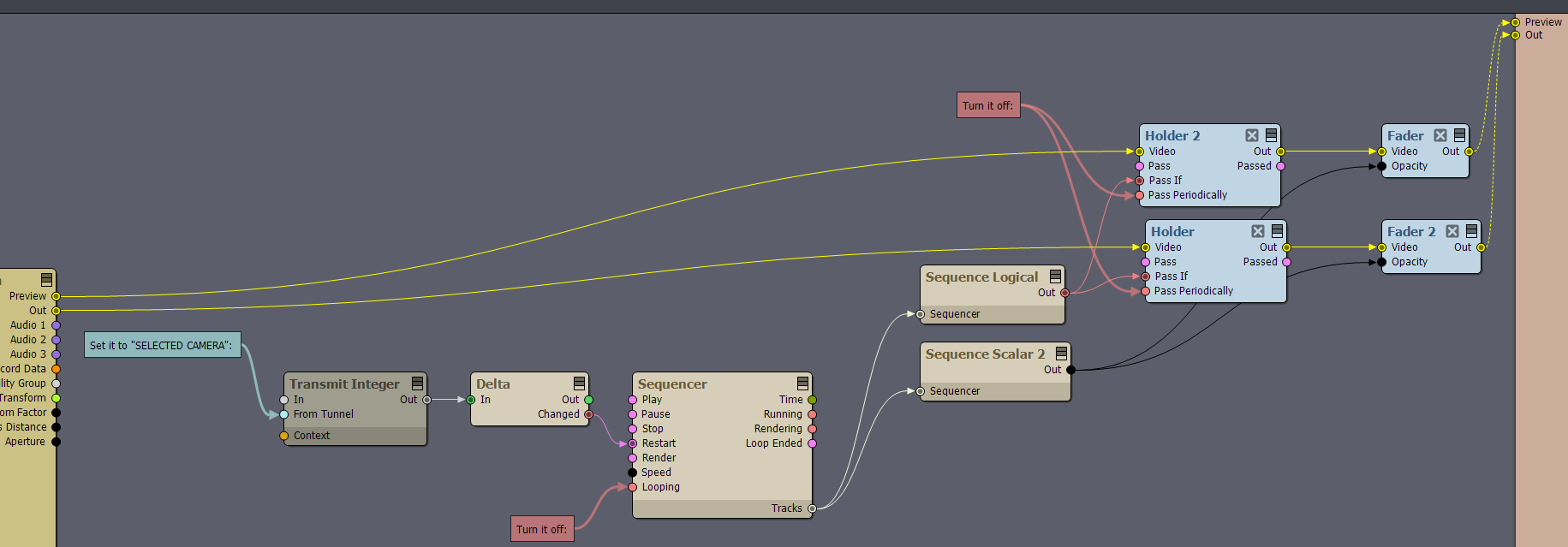
In Sequencer, the animation should look like this: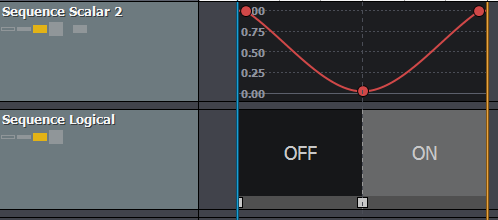
Note: Keep the scalar key value a little higher than 0. If the Fader module gets an exact zero, it will switch the video off.
Warmest regards,
GEKANG
-
The method is great, I don't know if you have noticed a problem, that is, when switching, the character is paused
Eifert@Aximmetry
-
Hi,
It is not only the character that appears paused; the entire image is held as well. What happens is that the logic keeps the last frame on screen, while, in the background, the camera compound has already switched cameras and started rendering from the new camera angle, allowing Lumen to adjust to that viewpoint.
In a single-machine setup, there is no way to render both views simultaneously. However, you can make this frozen frame less noticeable by shortening the fade-out time or by removing the held-frame section entirely and using only a fade-out. You can do this by editing the animation in the Sequence Editor and reducing the time spent in the Off state of the Sequence Logical.
Warmest regards,
You can’t cross-fade between cameras inside Aximmetry. This is because it only renders one perspective at a time. In order to cross-fade it would need to render the scene twice, effectively cutting the performance in half during the fade. You could program a custom “dip to black” fade in/out by triggering a smooth brightness animation from 1 to 0 and back to 1, while delaying the cut until the brightness reaches zero, effectively hiding the cut between cameras. If you want true cross-fade, you would have to use a professional studio setup, with one Aximmetry workstation per camera and an external video switcher.