Reflection 1 frames delay on hard camera cut.

Hello.

I am having an issue in Aximmetry where when i switch between cameras using Tracked Cam Compound, I am having a small delay in my reflections where it takes them exactly 1 frame to appear. 

I have tried to look around in the forum but didn't quite found a solution. 

Notice the black ¨C¨ that appeared on the wall in the next frameReflection 1 frames delay on hard camera cut.

You can watch a short video of the effect

https://drive.google.com/file/d/1VB8wZTKE0bo2p8Dykt2NQc0WG3DznLIV/view?usp=drive_link


I am using Nanite, no texture streaming, no translucency.


Would really appreciate the help.

Many Thanks.

Andrei.
   Blackfish Studio

Comments

Eifert@Aximmetry
  -  

Hi Andrei,

This is a normal limitation of how most reflection methods work. The calculation requires data from the previous frame. If the camera was in a very different position in the previous frame, the system may not have enough information to accurately generate the reflection.
This issue should be the most noticeable in Screen Space Reflection, because this method relies on the camera’s rendered image to create reflections. However, you might not encounter the same problem when using Lumen or Planar Reflection.

You can read more about different reflection methods here: https://aximmetry.com/learn/virtual-production-workflow/green-screen-production/unreal-scene-setup-green-scre#list-of-reflection-methods 

Warmest regards,

Blackfish Studio
  -  

Hello Eifret! thank you for your reply. 

I am using Lumen GI and Lumen reflections in my setup...

Is there a workaround ?

Eifert@Aximmetry
  -  

Hi,

We looked into it; this is expected with Lumen Reflections.

Here are three things you can try:

  1. Use Planar Reflections instead of Lumen Reflections.
    You can keep Lumen GI (global illumination) enabled while using a different reflection method. Planar Reflections can be added per surface and will override the global reflection method for those surfaces.
    Also, Lumen GI does not require Lumen Reflections to function, for example, you could use Screen Space Reflections instead. However, note that Screen Space Reflections will likely have the same issue as Lumen Reflections.

  2. Reduce Lumen’s reliance on temporal accumulation.
    Reducing temporal accumulation can sometimes minimize the “first frame after cut” artifacts. However, this is a trade-off; you may notice an increase in noise or shimmer as a result.

    To disable temporal accumulation for Lumen reflections, use the following console command in Unreal Engine:
    r.Lumen.Reflections.Temporal 0
    To reduce the extent of accumulation, adjust the maximum number of frames accumulated:
    r.Lumen.Reflections.Temporal.MaxFramesAccumulated <lower value>

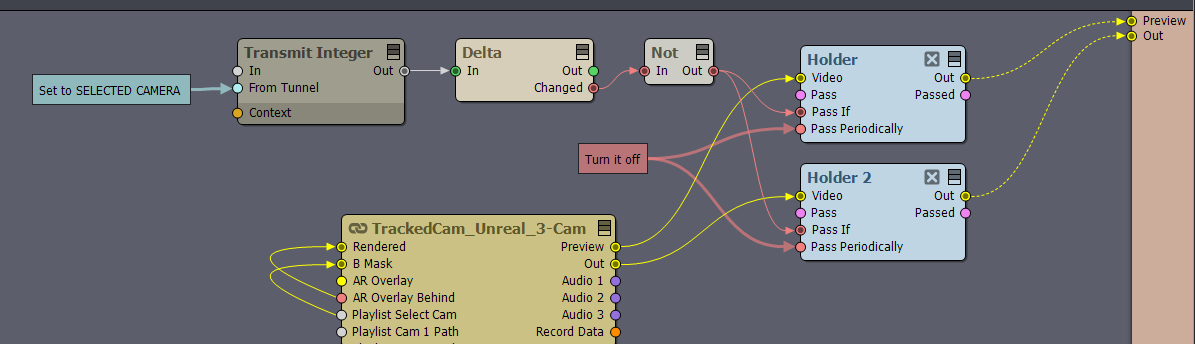
  3. Use a Holder module in Aximmetry.
    You can use a Holder module in Aximmetry to freeze the last frame for one frame before switching between cameras. If you’d like, I can provide a detailed guide on how to set this up.


Warmest regards,

Blackfish Studio
  -  

Thanks again Eifrat.

Option 3 sound interesting, and it would be great if you could specify some more information about it!

Best regards!

Eifert@Aximmetry
  -  

Hi,

It’s actually quite simple: you can use the Transmit Integer module to determine which camera is currently selected. You can find more information about transmit tunnels here: https://aximmetry.com/learn/virtual-production-workflow/scripting-in-aximmetry/transmit-tunnels-in-camera-compounds/#integer 
Set the Transmit Integer module’s From Tunnel pin to SELECT CAMERA. Use a Delta module to detect when the selected camera changes, and then connect a Holder module and Not module to the Holder module, so that it would only Pass when the change happens:Note: By default, the Holder module’s Pass Periodically pin is enabled. Make sure you turn this pin off.

Warmest regards,