URGENT! How to record tracking data with multi machine setup?

Hi! For a big project tomorrow I need to record the tracking data in a multi camera machine setup. I set up the recorder like this:
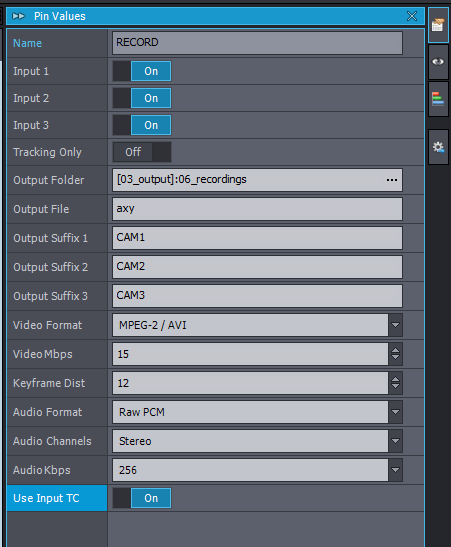
URGENT! How to record tracking data with multi machine setup?

The remote workstations do not record anything usefull - can you point me to the right direction, how to set this up?

Thank you, best, Jan

   chinzillafilms

Comments

Eifert@Aximmetry
  -  

Hi Jan,

Which version of Aximmetry are you using? There have been several fixes related to multimachine recording, including some in the most recent update. You can review those updates here: https://aximmetry.com/learn/virtual-production-workflow/which-aximmetry-is-right-for-you/software-version-history/#common-library-fixes-2 

Another common mistake is setting the Output Folder to a directory that the remote machines cannot access. I see you have set it to a project folder, but can you confirm whether its parent folder is set as the Project Root Folder on all the different computers running Aximmetry? This is important to ensure all machines are referencing the same location.

Warmest regards, 

chinzillafilms
  -  

Thank you Eifert! For the production we solved the „problem“ by running three separated instances of Composer - not a multi machine setup. But the output folder was a shared project folder on our NAS, so it should work I think. I am using the latest version.

Eifert@Aximmetry
  -  

Hi Jan,

Thank you for reporting this issue. We have found the cause, when the location is in a networked folder (- UNC path, even if it's an Aximmetry project folder), the tracking data (.xdata file) is either not saved or is incorrectly saved under the Documents folder. Note that this problem does not occur if you use a mapped network drive, so you can use that method to be able to save recordings in a multi-machine setup.

We will address and fix this problem in a future update.

Warmest regards,