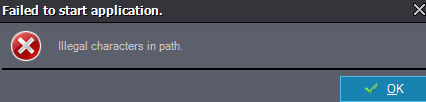
Faild to start application
评论
Eifert@Aximmetry
-
Hi David,
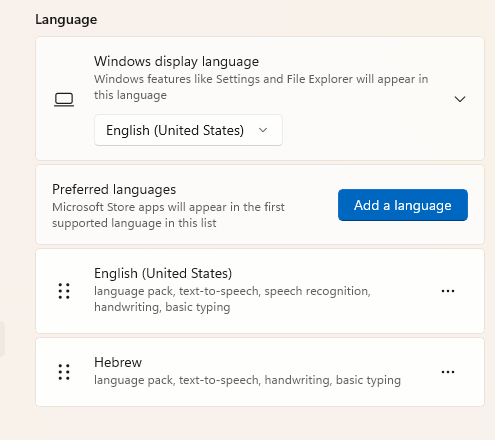
Could you let us know which region and language are set in your Windows settings? It would also be helpful if you could list all the languages installed on your Windows.
Additionally, does your Windows user account name contain any special or non-English characters (for example, characters not included in the standard English alphabet)?
Warmest regards,
Eifert@Aximmetry
-
Hi David,
We've tried every combination of settings using your language, but unfortunately, we could not reproduce the issue. The most likely reason for this problem is that something might be wrong with the Documents folder in Windows. This folder is located under each user's directory.
Please try the following steps to check your Documents folder:
- Open File Explorer by pressing Win + E.
- In the left pane, look under "Quick access" or "This PC," then click on "Documents."
- Right-click on the "Documents" folder and select "Properties."
- Check the "Location" tab to make sure the path is correct (for example, it should not be set to a drive that no longer exists).
See the screenshot below for reference: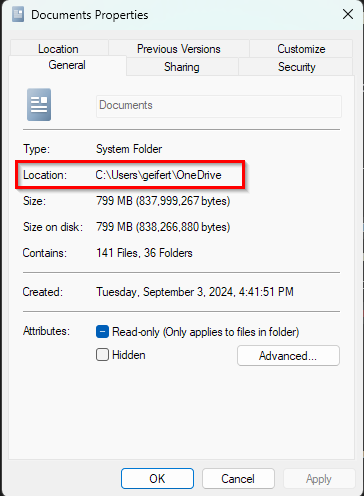
If the folder path contains unusual or special characters, it could potentially cause issues. However, we have already checked for this, so it should not be the cause unless there is something unique about your setup.
Additionally, could you please let us know which version of Windows you are using (Windows 10 or 11, Home or Pro)?
Warmest regards,
Hi David,
Which version of Aximmetry are you using, and when does this window appear?
Note that in versions prior to 2023.2.0, there was a startup issue if the Windows regional settings were set to Norwegian.
Warmest regards,