Regarding the lens calibration issues of the new version of Aximmetry 2025.3

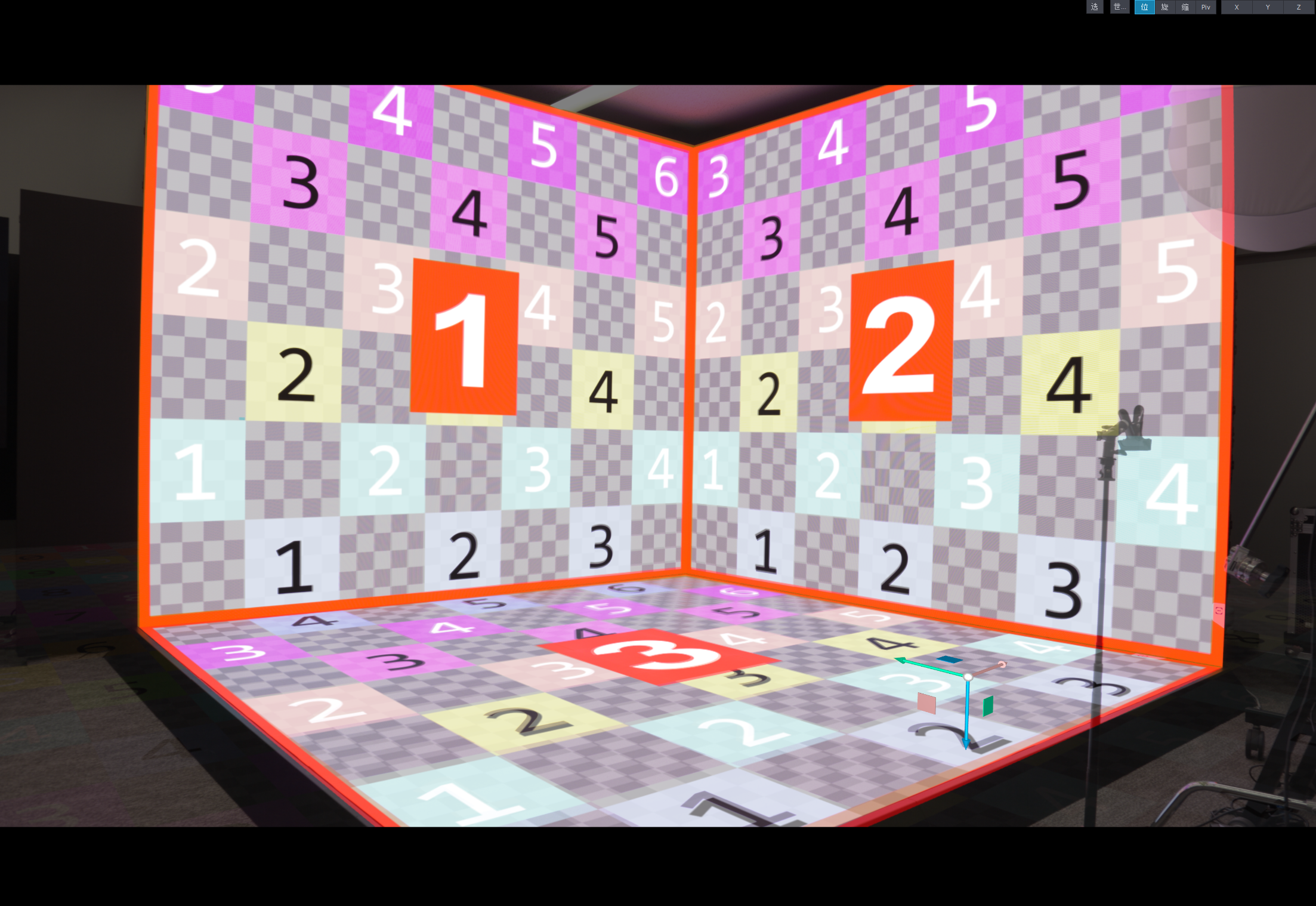
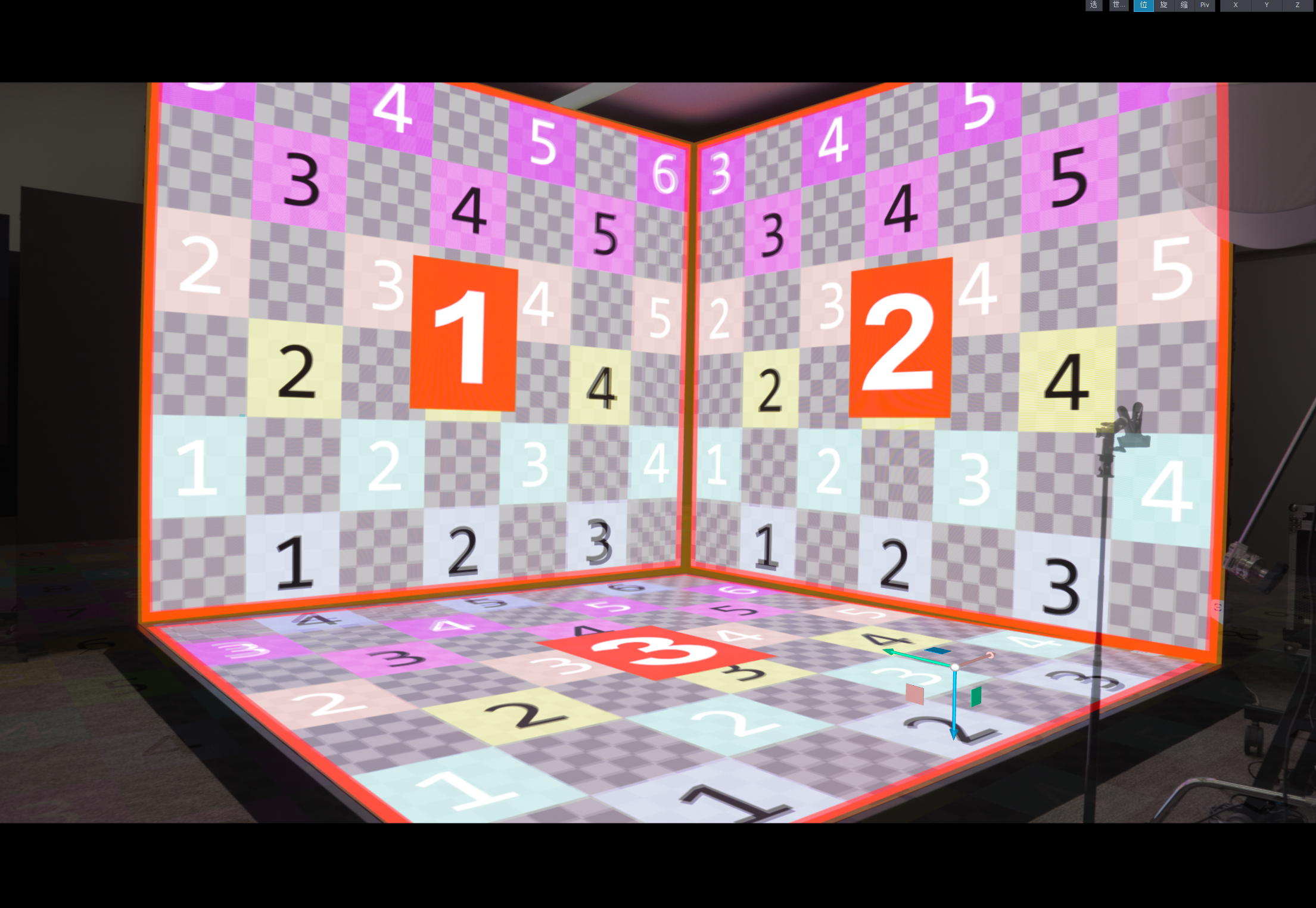
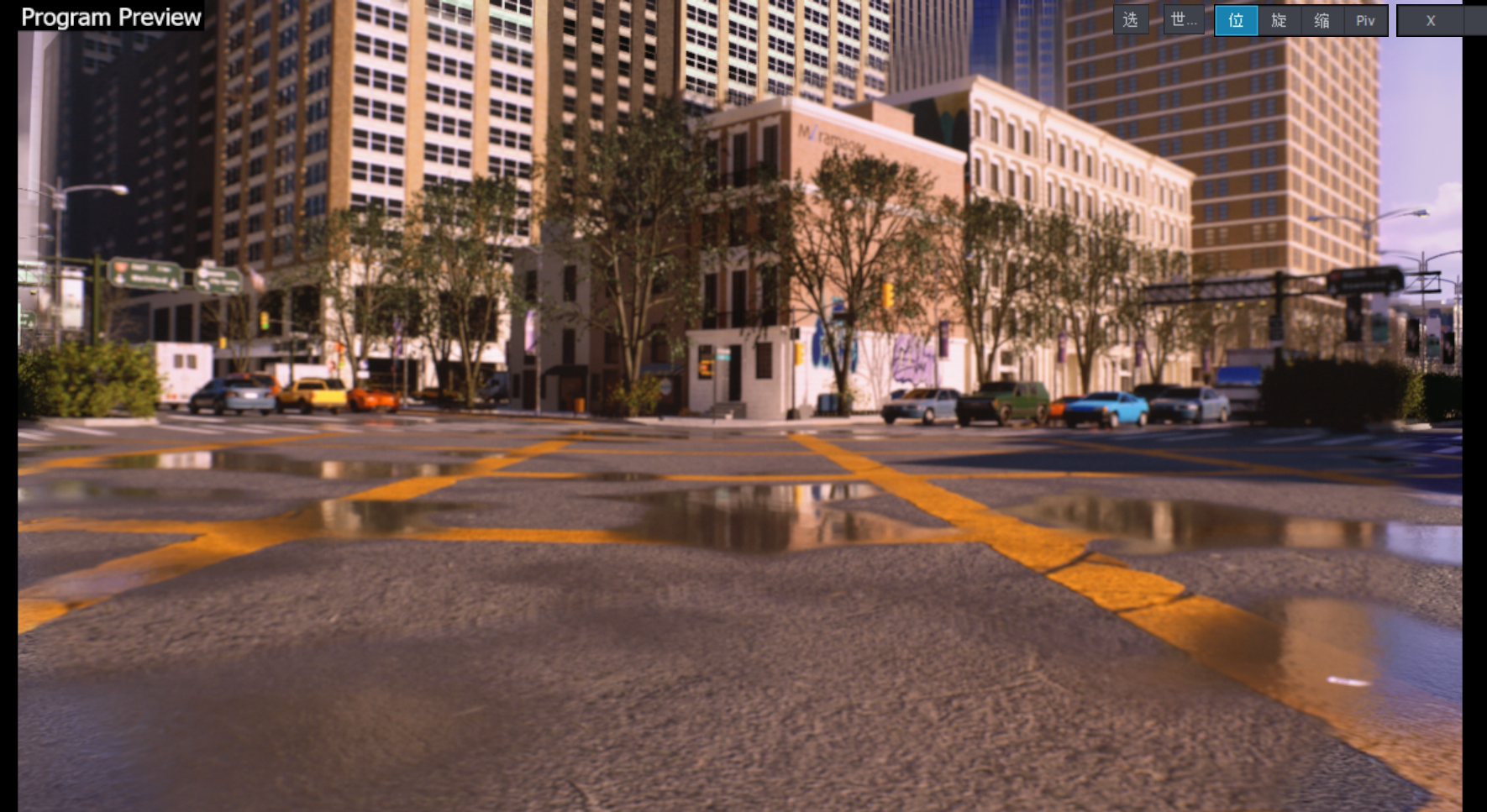
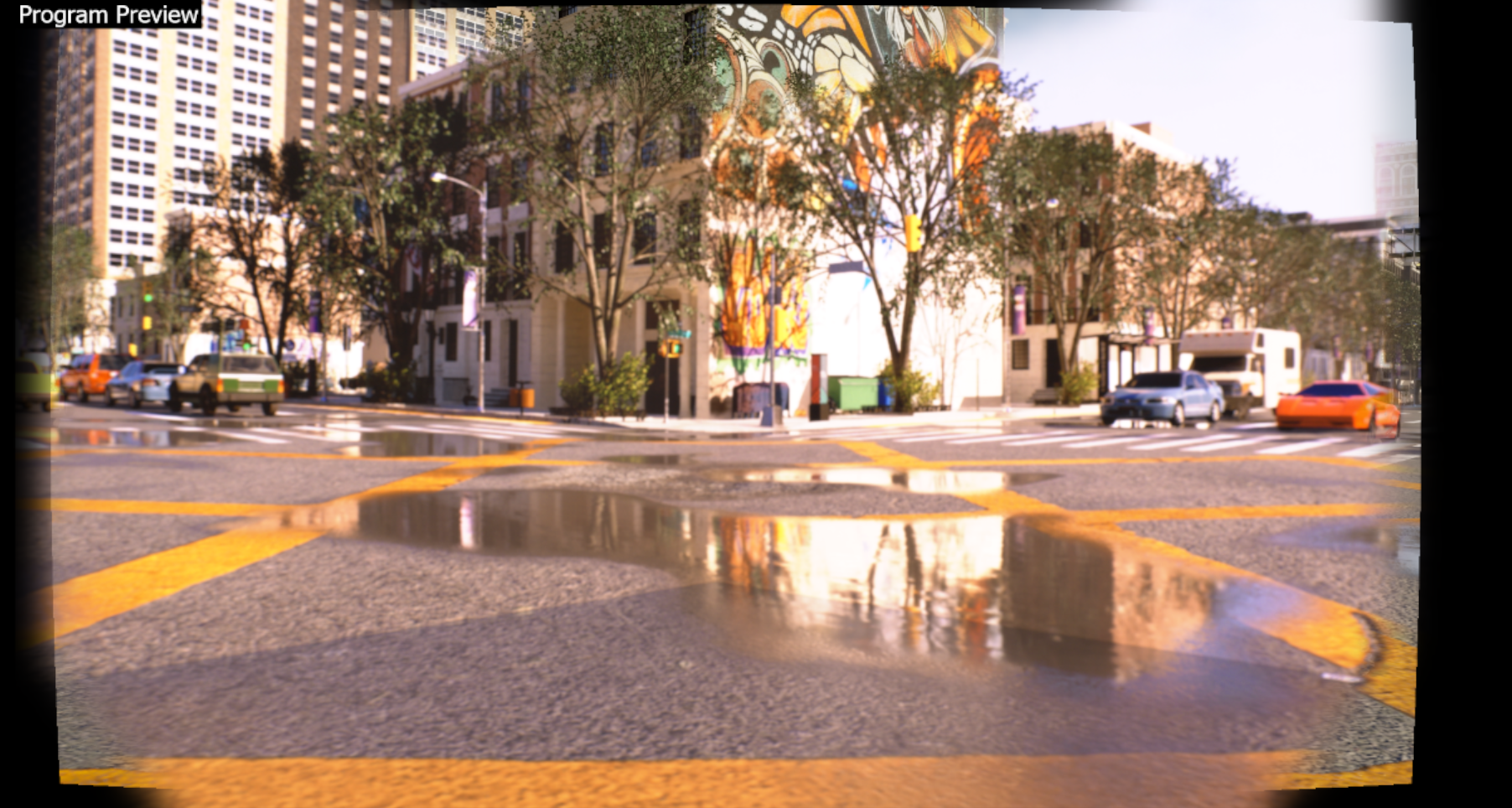
We are currently using 2025.2 and the latest 2025.3. We found that the same project can get good full coverage of the field of view in the old version. But in the new version, there seems to be additional distortion at the edges, which makes the picture not fully occupied.
Regarding the lens calibration issues of the new version of Aximmetry 2025.3

This is the effect of the old version
Regarding the lens calibration issues of the new version of Aximmetry 2025.3

This is the effect of the new version

We tried to make a new lens file, but when we used the latest camera calibrator in combination with redspy, we found that when the zoom device is empty, it will not be able to proceed to the next step of zoom calibration. But we have used stypehf to transmit the complete position and external lens data. If an additional free d information from redspy is added as a zoom device, the next step can be carried out. However, when we use stypehf for the tracking device and free d for the zoom as the signal input to the old calibration file, we will find that its tracking calibration movement will become very exaggerated. But if we remove free d, it will become normal. We are worried that adding the zoom device in this way will cause abnormal results. So we want to know how to do it and whether we have done something wrong.

We also noticed that when we unchecked the multi-machine option, the next startup interface seemed to hide this option, so we had to go back to the old interface to adjust it.

I hope to get your answer as soon as possible
   Miramage

Comments

JohanF
  -  

Wouldn’t you do the lens calibration with the Stype system? The Stype calibration is much, much better than the Aximmetry calibration and you shouldn’t need to use FreeD either. The Stype tracking data comes complete with lens data. No need to use the Zoom Device. 

Eifert@Aximmetry
  -  

Hi,

If you are also using StypeHF for the Zoom device, then you experience irregular movement tracking because positional data is applied twice. The Zoom device parameter can also function as PTZ (rotation and position) tracking on a tracked camera arm (in that case, the tracked camera arm must be set as the Camera Device, and the PTZ camera as the Zoom Device).

Many changes were introduced in version 2025.3, particularly in the INPUT panel. Some of these changes require updated configuration, as older settings cannot always be copied directly. It is likely this is why you are experiencing your issues.
For example, if you previously used the Manual Lens setting, you will now need to configure some of the Override settings instead. The parameters for the INPUT panel are documented here: https://aximmetry.com/learn/virtual-production-workflow/green-screen-production/tracked-camera-workflow/inputs-tracked-camera/ 

Note, the Edge Expand parameter is designed to address cases where lens distorted rendered scene doesn't cover the entire frame (like in your second screenshot). If you are using a tracked green camera compound, refer to the following link: https://aximmetry.com/learn/virtual-production-workflow/green-screen-production/tracked-camera-workflow/scene-control-panel/#edge-expand  

Warmest regards,

Miramage
  -  

Hi,

In fact, we are currently working with the LEDWallCam_3-Cam_4-Wall. We mainly use it for shooting LED screens. We haven't found the corresponding Edge Expand option, which might only exist in the trackcam. The result of our shooting still has a black border around it.

We are still using redspy for camera tracking. We tried to select the option to obtain external lens calibration data in the tracking calibration, but the result didn't seem much better.

We still have doubts about lens calibration because no matter how we make the lens file, as long as the camera moves or rotates slightly, the virtual wall and the LED screen will always be misaligned. This is very frustrating and we can't achieve a perfect virtual production effect. At the same time, because the cameras we use are too heavy and the pitch angle of the tripod is limited, it takes a lot of effort and time to calibrate the ground each time.

We wonder if there is a more convenient way to calibrate the ground. We hope to get more guidance in this regard.

Eifert@Aximmetry
  -  

Hi,

The Edge Expand parameter for LED Wall camera compounds is located in the FRUSTUM panel. Since your original post, we have published an initial version of the LED Wall documentation, which could be very helpful for you. This documentation also includes a description of Edge Expand here: https://aximmetry.com/learn/virtual-production-workflow/led-wall-production/setting-up-the-led-walls/frustum-adjustments/#edge-expand  


You mentioned:
"as the camera moves or rotates slightly, the virtual wall and the LED screen will always be misaligned"

This strongly suggests a tracking issue or an incorrect placement of the LED Wall in the camera compound. Test your calibration and tracking by following the instructions on this page: https://aximmetry.com/learn/virtual-production-workflow/tracking/testing-of-the-calibration/testing-of-the-calibration/ 
To set up the LED Wall properly, follow these pages:


You mentioned:
"At the same time, because the cameras we use are too heavy and the pitch angle of the tripod is limited, it takes a lot of effort and time to calibrate the ground each time."

Are you referring to tracking calibration using the Camera Calibrator? We are aware that many camera setups cannot tilt down as much as required, and we intend to provide fixes or workarounds in the future.
However, note that this is not ground position calibration. That calibration calculates the position of your camera (camera sensor) relative to the tracking device (tracking position).

The alignment of the scene and your scene’s virtual floor with the physical floor is done within the SCENE panel of the LED Wall camera compound. You can find more information here: https://aximmetry.com/learn/virtual-production-workflow/led-wall-production/setting-up-the-inputs/scene-positioning/ 
If your tracking system does not know or determine your studio's ground level, you can use the ORIGIN panels:  https://aximmetry.com/learn/virtual-production-workflow/tracking/advanced-information-and-features/camera-and-head-transformations/#origin-panels 
However, RedSpy systems usually know where the ground is and send tracking data with the correct height.

Warmest regards, 

Miramage
  -  

Hi,

Thank you for your prompt reply!


We just discovered the documentation has been updated and will take the time to review it again for testing.


We tried the `edge expend` function in that module, which is meant to widen the projected image onto the LED wall, but it didn't solve the problem of the external extension not filling the screen.


Regarding the LED misalignment issue, we will again verify the LED size and actual display resolution. However, based on our previous screen calibration experience, we have adhered to and ensured that the image size displayed on the LEDs is consistent with the specifications in the documentation.


We suspect that a lens calibration issue is causing the LEDs to misalign. When using the automatic alignment function, the image near the center of the LEDs aligns correctly, but there is always a slight misalignment at the edges. This means that when using the automatic alignment function, our three existing LEDs cannot be perfectly aligned at the seams. This problem exists regardless of whether the tracking data provided by Redspy or the files created using Aximmetry's lens calibration are used. Meanwhile, the problem encountered when moving the camera isn't a large-scale misalignment, but rather a slight, cumulative misalignment that only becomes completely misaligned between the virtual screen and the real LEDs after rotation or displacement to a certain extent.


After analyzing the problem, we know it's likely due to issues with the lens calibration data, but we don't know how to adjust it appropriately. We will try to resolve this after reviewing the existing documentation. Or could you provide some suggestions for reference?


Regarding your explanation of ground calibration, can we understand that it's a necessary setting for tracking systems that cannot provide accurate height for positioning, or for different tracking systems to use the same set of LED settings simultaneously? And systems like Redspy, which provide accurate data, don't need this calibration and can rely on their own stypehf data?