👉Unreal Engine
- AX Scene Editor / AX Render Node has been upgraded to Unreal Engine version 5.8.2.
👉AI Integration
- Added embedded AI Assistant providing a built-in chat interface.
- Added MCP server functionality to allow using any third-party AI agent.
👉Native Gaussian Splat (experimental)
- Added support of importing and rendering Gaussian Splat models in the Aximmetry Native Engine (no UE required).
- Added GaussianSplat_ForBillboard.xcomp to be used together with any native VirtualCam or TrackedCam compound for creating a Gaussian Splat-based virtual production.
👉Aximmetry system
- Added Follow Audio feature to the Video Switcher compound.
- Allowed specifying a custom frame size for streaming output devices (RTMP, YouTube, Facebook etc.), enabling portrait mode streaming.
- Added L-shaped billboards for native VirtualCam compounds allowing more accurate shadows and reflections.
- Added new AO mode: Advanced for native VirtualCam compounds allowing more realistic AO.
- Numerous improvements and fixes.
More details:
➡ https://aximmetry.com/learn/software-version-history/ 
Hi,
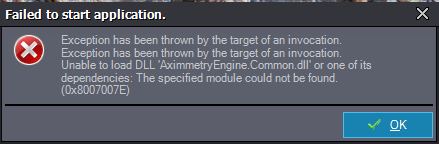
I tried installing this on my Home PC, as my course workflow requires students to install the software on their personal laptops or PCs. I followed all the usual steps like installing VS Insider Individual Components and Workloads specifically for 2026.4.0 according to your learning resources.
However, I still got an error
I could not even load the license entry window.
Please help me to understand what is missing. Installation on a few of my school Lab PCs seem to have no issues for some reason.
Terence