Hi there.
Could it be that the PaintText module is broken?
Whatever I do, no text will be rendered at all.
(The rectangle is just a 'control' to make sure the PaintView actually does render an output)
Or is there any hidden magic I'm missing with PaintText?
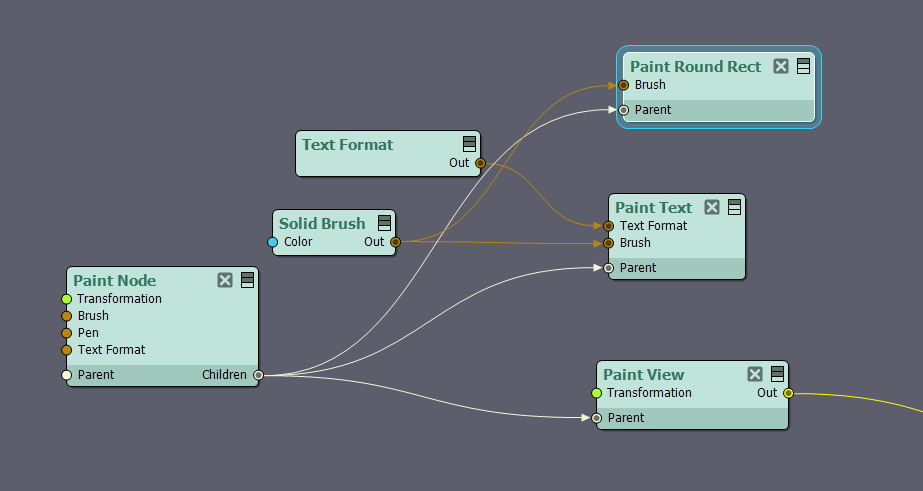
Cheers & all the best.
Eric.
Hi Eric,
There's probably nothing wrong with the Paint Text module — the behavior you're seeing almost certainly comes from the Paint View and Text Format modules.
Start with the Pixel Mode pin on Paint View. It defines how the coordinates of painted components (such as Text) are interpreted:

Pixel Mode is Off: components are visible when their X and Y coordinates fall roughly between -1 and 1. Components in this range will be visible, regardless the frame resolution.
Pixel Mode is On: coordinates map directly to screen pixels. At a rendering resolution of 1920x1080, for instance, anything placed between 0,0 and 1920,1080 will be on screen.
Disabling Pixel Mode is the better choice when you want your setup to adapt to different frame resolutions; enabling it makes scene setup more intuitive when the frame size is fixed.
In Paint Text, the Left Top and Right Bottom pins define the coordinates of the Text component's area (the textbox):

It's also worth checking that the Text pin isn't empty.
The other setting affected by Pixel Mode is Font Size, located on the Text Format module:

With Pixel Mode disabled and Font Size at its default of 100, the text is rendered so much larger than the frame that nothing is visible — which is very likely what happened here.
There are two ways to fix it: lower the Font Size to around 0.x as shown above and keep Pixel Mode disabled, or enable Pixel Mode so that a Font Size of 100 is interpreted as 100 pixels.
Warmest regards,
Adam