can a use motion design level from unreal like we use sequence level ?
can a use motion design level from unreal like we use sequence level ?
コメント
huseen
-
I think many people misunderstood my question!
I'm asking how to use the Motion Design level within my project, not as a separate project.
This means I'll include it in Blueprint within my project, and then in aximmetry I can change the images and text.
Adam@Aximmetry
-
Hi huseen,
You can add Motion Design elements to any existing level.
First, enable the Motion Design plugin by going to Edit > Plugins.

After enabling the plugin, restart Unreal Engine. Once
Unreal Engine has restarted, a Motion Design button should appear to the
right of the Play controls. Click this button to create a Motion Design
scene for the current level.

Unreal Engine will then open the Motion Design Editor
interface, where you can place Motion Design actors.
NOTE: For the following examples Unreal Engine 5.6 and Aximmetry
2026.2.0 were used.
This first example will show you how to change the text of a UE scene in Aximmetry.
Let’s add a Text Actor to the scene.

Open the Level Blueprint and drag-n-drop your Text3DActor
from the Outliner window, to create a reference node.
Add the nodes and create the connections shown in the screenshot below.

The Name of the Get Aximmetry Text node will be the name displayed on the new pin of the UE scene’s module in Aximmetry.
Compile and save the blueprint, then load the scene into
Aximmetry.
Locate the pin with the same name you gave to the Get Aximmetry Text
node in Unreal. In this example it is MD_Text.

If you connect a Copy Text module’s output to this pin, you will be able to control the text via the In pin’s value:


To change the image in the UE scene in Aximmetry, we will add a Rectangle Actor to the scene and make its texture (i.e. the image) controllable from Aximmetry.

Open the Content Drawer and create a new Material.
Double-click the new Material to open it in the Material Editor.
Add a Texture Sample node, then right-click the node and choose Convert
to Parameter. In the Details panel, set the Parameter Name. We
used TestTexture.
Next, select any texture as the base texture under Material Expression
Texture Base in the Details panel. This prevents Unreal Engine from
reporting an error caused by the base texture parameter being NULL.
Connect the RGB output of the Texture Sample node to the Base
Color input of the material node.

Then click Apply and Save.
After that, select the Rectangle Actor. In the Details panel, go to Material, set the material type to Asset, and choose the material file you just created.

Next, open the Level Blueprint and recreate the blueprint setup shown in the screenshot below.
Drag-n-drop the Rectangle actor from the Outliner panel to
create the reference in the blueprint.
On the Create Dynamic Material Instance node, make sure the Parent
pin is set to the material you created.
On the Set Texture Parameter Value
node, make sure the Parameter Name pin exactly matches the parameter
name assigned to the Texture Sample parameter in the Material Editor.
The Name pin of the Get Aximmetry Video node
determines the name of the pin that will appear on the UE scene’s Aximmetry
module. This pin is used to send the texture from Aximmetry to Unreal Engine.

Click Compile, then Save.
When you load the scene in Aximmetry, you should see a pin with the name you assigned. In this example, the pin is named MD_Video.

You can now connect any video or image to this pin, and it will appear as the texture on the Motion Design Rectangle.

Warmest regards,
Adam
huseen
-
Thank you, Adam@Aximmetry.
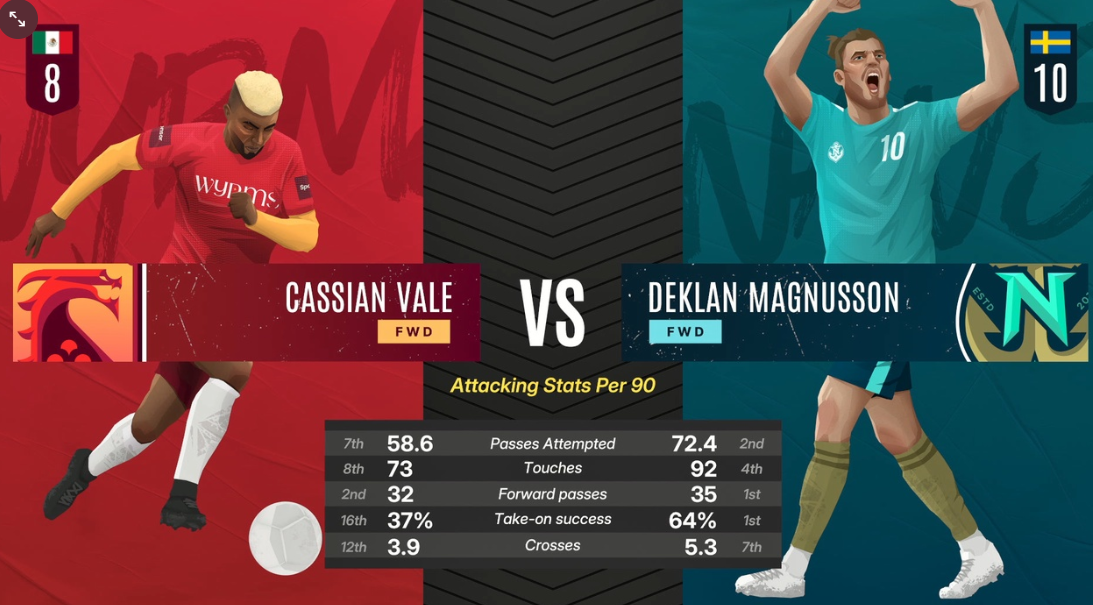
I know all this. I've moved on to aximmetry and I'm asking about some capabilities I'm missing. What I want to implement is this.
huseen
-
I've implemented a complete studio, but I need these tools so I don't have to revert to the previous program.
Adam@Aximmetry
-
Hi huseen,
Based on your responses, we understand your setup as follows:
You have a completed virtual studio set built in Unreal.
You also created the football players’ statistics graphic in Unreal Motion Design, as shown in the screenshot you shared.
You want to send the players’ data (names, statistics, and images) from Aximmetry to Unreal and use that data in the Unreal graphic.
To achieve this, you were missing the capabilities to establish the data connection between Aximmetry and the Unreal graphic.
We provided instructions for doing this in our previous comment.
Please let us know the exact capabilities you are missing in order to complete your project, and how we can assist you further.
Warmest regards,
Adam
Hi huseen,
Yes, you can use a level with Motion Design similarly to how you would use a Level Sequence.
For example, you can:
- Create a dedicated level for motion graphics.
- Animate Motion Design actors with Sequencer.
A typical workflow would be:
1. Create or open a level.
2. Enable Motion Design mode.
3. Build your graphics, including text, shapes, cloners, effectors, and other elements.
4. Animate those elements in Sequencer.
You can also work with Motion Design assets without Sequencer by driving them through Blueprints, for example.
Warmest regards,
Adam