Bug Report: Block noise during camera movement in Aximmetry 2025.3.0

Hi Support Team,

I'm encountering an issue with block noise in the final composite using Aximmetry 2025.3.0.

The artifacts only appear when the Monitor Mode is in Keyer or Final and the camera is in motion. The clean feed remains unaffected. Please see the recorded video below for reference:

https://vimeo.com/1183621219?share=copy&fl=sv&fe=ci

Is this a recognized bug? I would appreciate your feedback on how to resolve this.

Best regards,
   daichi

コメント

daichi
  -  

Upon investigating further, I discovered that the block noise disappears when I adjust the "FadeDownScale" value within the TrackedCam_Unreal_3-Cam node.

Could you please clarify if there is any specialized processing or unique logic applied to this specific parameter? I would like to understand if changing this value might lead to other side effects.

Best regards,

Bug Report: Block noise during camera movement in Aximmetry 2025.3.0Bug Report: Block noise during camera movement in Aximmetry 2025.3.0


Bug Report: Block noise during camera movement in Aximmetry 2025.3.0

Eifert@Aximmetry
  -  

Hi,

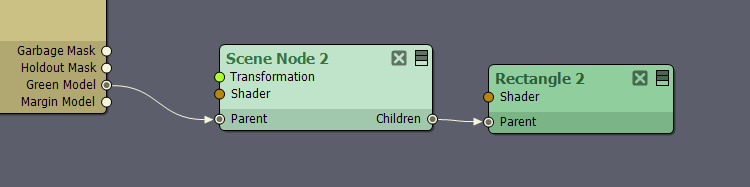
If the problem is the three gray dots appearing in the middle of your green model in your last screenshot, that almost certainly indicates holes in the green model’s 3D model. It could be caused by minor issues in the model itself, such as a misplaced vertex or face.

The easiest workaround is to place 1–2 rectangles (built in basic shape module of the Flow Editor) over those holes in Aximmetry:
Bug Report: Block noise during camera movement in Aximmetry 2025.3.0


Regarding the FadeDownScale solution you used, one side effect is a slightly increased performance load, since the green model mask is rendered at your production resolution. It also disables Mask Edge Fade, which probably made the holes less or more noticeable. You can find more information about Mask Edge Fade here: https://aximmetry.com/learn/virtual-production-workflow/green-screen-production/tracked-camera-workflow/studio-control-panel/#mask-edge-fade    

Warmest regards,