Aximmetry eye AR 9:16

Hi, I have a question. We are experimenting with aximmetry eye and I would like to ask if there is any chance that if we can in our standard broadcast project which is 4k we can use iPhone feed with aspect ratio of 9:16. Use case is that we will record some stuff for social sites.

Thanks, David
   Borgis

コメント

Eifert@Aximmetry
  -  

Hi,

Yes, Aximmetry Eye can send video in a 9:16 ratio if your phone supports recording in that exact ratio.

If your entire workflow will be in 9:16 portrait mode, with no landscape (16:9) content in your production, you just need to set the rendering frame size of the Aximmetry Composer to a resolution with a 9:16 ratio as well.

Additionally, you should be using the latest version of Aximmetry. We have made significant improvements to the camera compounds over the past two years to make them work better in portrait mode.

Warmest regards,

Borgis
  -  

Hi Eifert, thanks for responding. Rest of our workflow is in 16:9 so that is why Im asking for this. Momentary solution is that we need to change settings of frame size.

Eifert@Aximmetry
  -  

Hi,

If you want to incorporate 9:16 video into a 16:9 production, this can cause a few problems, depending on the type of production you are working on (e.g., AR, tracked green screen, virtual green screen, or LED).

However, if I understand you correctly, you want to switch between 9:16 and 16:9 video (final) outputs. Effectively changing the rendering frame size in Aximmetry, depending on which camera is being used. If that's the case, you can automate this switch using the Set System Params module in the Flow Editor. With it, you can set up the automation so that when the SELECTED CAMERA integer transmit tunnel switches to a camera (video input) with a 9:16 aspect ratio, the system automatically changes the frame size. You can learn more about the SELECTED CAMERA integer transmit tunnel here: https://aximmetry.com/learn/virtual-production-workflow/scripting-in-aximmetry/transmit-tunnels-in-camera-compounds/#integer  
If this matches your requirements, I can show you how to set it up in the Flow Editor. If not, please provide a bit more information about your workflow.

Warmest regards,

Borgis
  -  

That is exactly what I wanted, so if you can guide me, I would be greatful.

Eifert@Aximmetry
  -  

Hi,

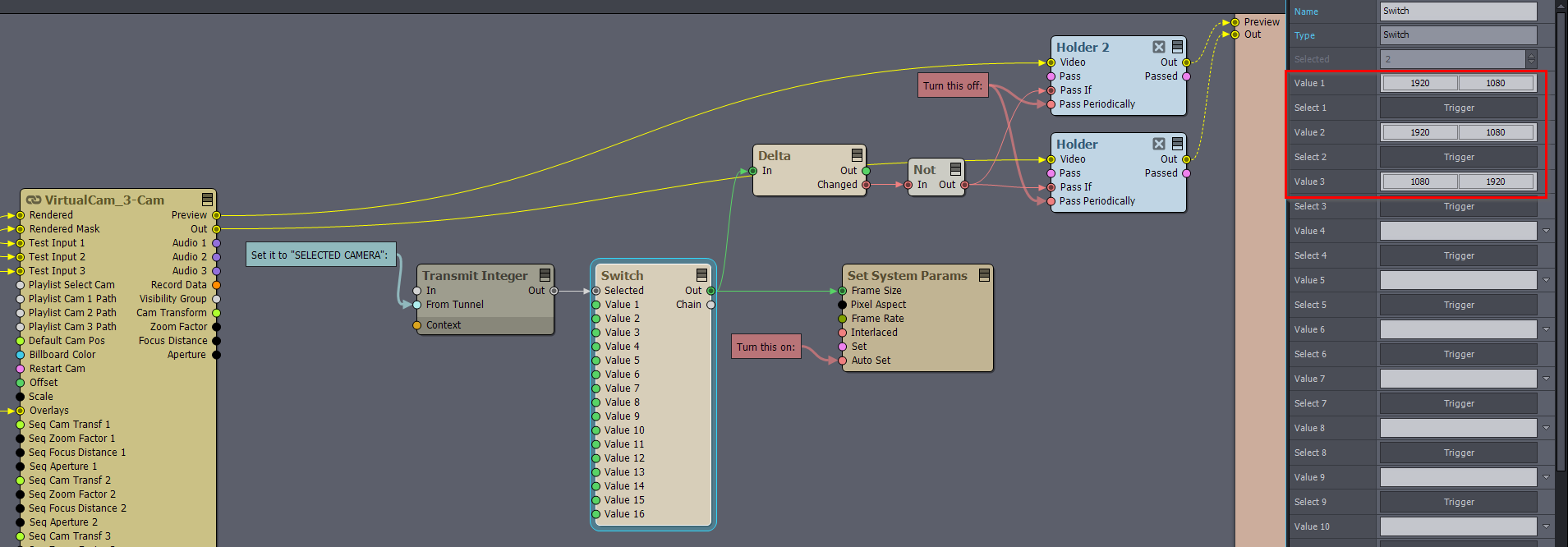
You should set up the Flow Editor graph like this:


  • In the Transmit Integer module, set the From Tunnel pin to SELECTED CAMERA. This reads the currently selected camera index of the Camera compound.
  • In the Switch module, set Value 1 / Value 2 / Value 3 / … to the target Frame Size (Width × Height) for each camera (e.g., 1920×1080, 1080×1920). This defines the desired resolution per camera.
  • Make sure that the Set System Params Auto Set pin is turned on.
  • Turn off Pass Periodically on the Holder modules.


Why the Delta -> Holder logic is necessary:
The resolution change made by Set System Params takes effect on the next frame, not in the same frame where the selected camera changes. The Delta → Not → Holder chain holds (repeats) the previous frame for one frame whenever the resolution value changes, preventing a single-frame mismatch.

Warmest regards,