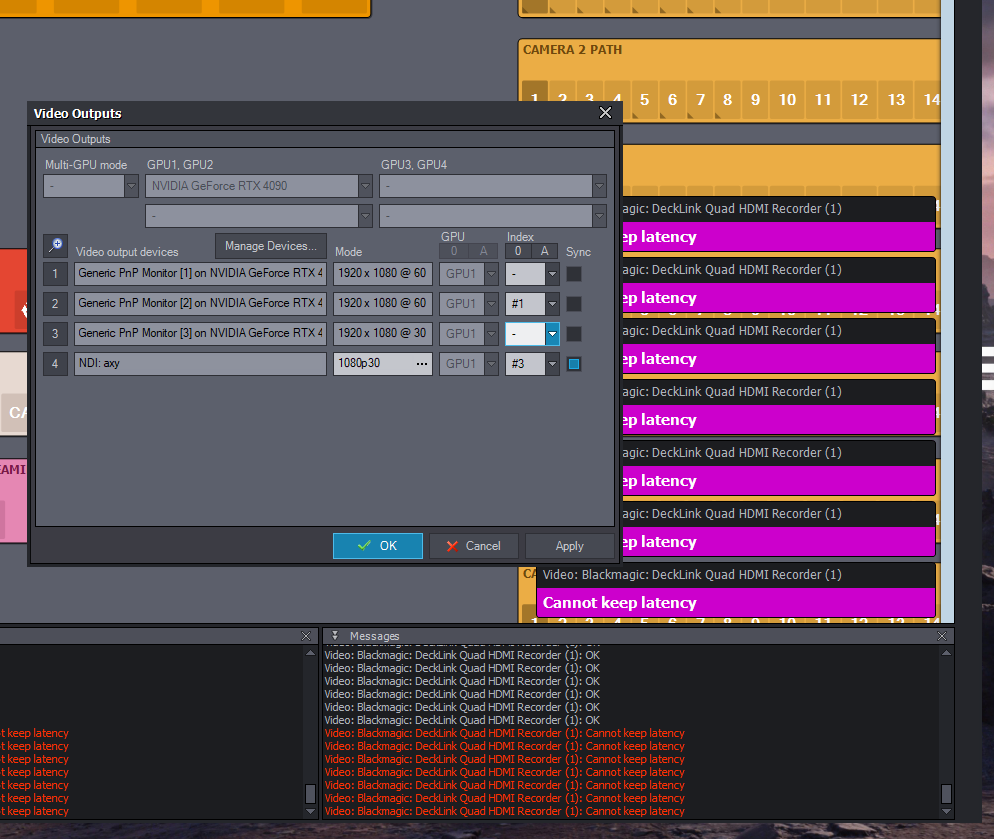
I am using NDI output and noticed that my Blackmagic DeckLink Quad HDMI capture card cannot keep latency when selecting "Sync" on my NDI output.
I was testing NDI as a primary program output and need to use sync on that output. Is sync not supposed to be used on NDI outputs?
Hi,
I think this issue might not be related to NDI. If you sync to your third monitor, which also has a 30 fps frame rate (the same as your NDI stream), do you experience the same issues? If so, that could help narrow down the cause.
You should also try increasing the In-to-out Latency to address the "Cannot keep latency" errors. You can find more information about this here:
https://aximmetry.com/learn/virtual-production-workflow/inner-workings-of-aximmetry/in-to-out-latency/
If you were using a frame rate lower than 30 fps, that would explain the source of the problem. Since In-to-out Latency is measured in frames, using a lower frame rate means each frame has a longer time to be processed. Conversely, increasing the frame rate reduces the available processing time per frame, which could lead to "Cannot keep latency" errors.
From the errors, it seems you are using the Decklink Quad HDMI Recorder (1) in seven different locations in your project. While this setup is not ideal, it should not directly cause problems. However, it's something to keep in mind if you continue to encounter issues.
Warmest regards,
Don’t use Sync on the NDI output! Problem solved ;-)