JP
EN - English
CN - 中文
JP - 日本語
How do I rotate Unreal project in aximmetry?
Hi,
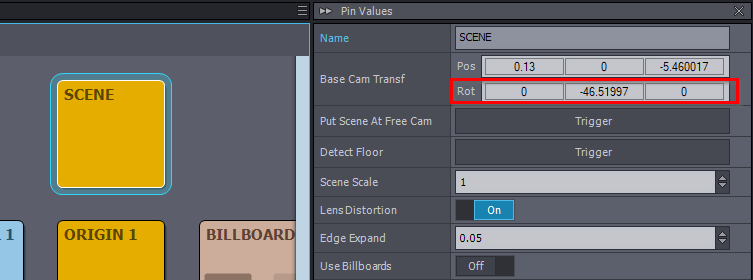
For tracked cameras, you can adjust the camera's base rotation using the Base Cam Transf - Rot parameter in the SCENE panel:
For virtual green cameras (which do not have the SCENE panel), it is recommended to parent the Aximmetry camera within the Unreal Editor and move the parent object. Although this method is typically used for animating cameras directly in Unreal, it works well for setting up virtual green camera positions too. You can find more details in the official Aximmetry documentation here: https://aximmetry.com/learn/virtual-production-workflow/obtaining-graphics-and-virtual-assets/creating-content-in-unreal-editor/preparing-the-unreal-project/#animating-camera-with-unreal
Warmest regards,
アップロード中にエラーが発生しました。再試行してください。
Hi,
For tracked cameras, you can adjust the camera's base rotation using the Base Cam Transf - Rot parameter in the SCENE panel:
For virtual green cameras (which do not have the SCENE panel), it is recommended to parent the Aximmetry camera within the Unreal Editor and move the parent object. Although this method is typically used for animating cameras directly in Unreal, it works well for setting up virtual green camera positions too. You can find more details in the official Aximmetry documentation here: https://aximmetry.com/learn/virtual-production-workflow/obtaining-graphics-and-virtual-assets/creating-content-in-unreal-editor/preparing-the-unreal-project/#animating-camera-with-unreal
Warmest regards,