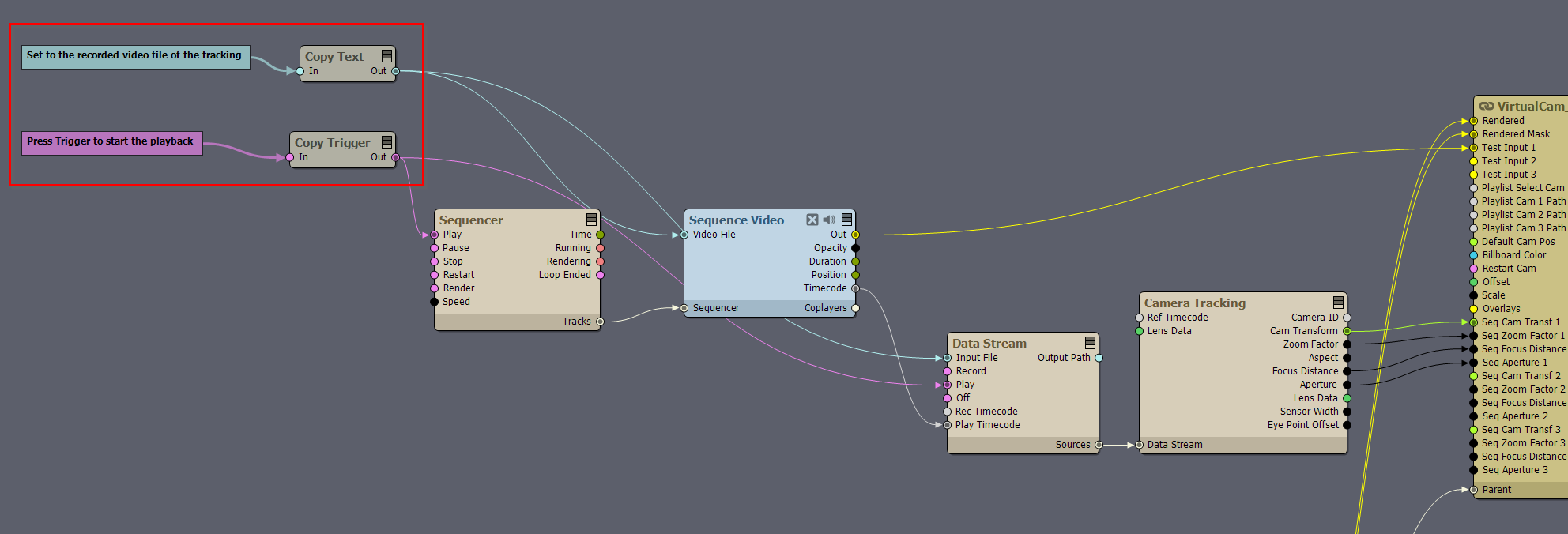
You will need to add the Sequencer, Sequence Video, Data Stream, and Camera Tracking modules, and connect them as shown in the image below. Use the Copy Text module to set the recorded video file for tracking, and use the Copy Trigger module to start playback: Note: the recorded video is connected to the Test Input 1 pin, so you can use the video captured along the tracking as a Billboard.
Hi,
Yes, you can do it by using the Sequence pin functionality in the virtual camera compound. Turn on the SEQ button in the Camera 1 Path panel.
For more information on SEQ, see the documentation: https://aximmetry.com/learn/virtual-production-workflow/green-screen-production/virtual-camera-workflow/camera-sequencer/
You will need to add the Sequencer, Sequence Video, Data Stream, and Camera Tracking modules, and connect them as shown in the image below.
Use the Copy Text module to set the recorded video file for tracking, and use the Copy Trigger module to start playback:
Note: the recorded video is connected to the Test Input 1 pin, so you can use the video captured along the tracking as a Billboard.
Warmest regards,