JP
EN - English
CN - 中文
JP - 日本語
Hi
I want to know the role and usage of the Talent Trk Area Size.
May I know how to use it?
Thanks!
Hi,
It is a helper graphic to align the tracking system of the camera with the tracking system of the billboard:
More on it here: https://aximmetry.com/learn/virtual-production-workflow/preparation-of-the-production-environment-phase-i/green-screen-production/tracked-camera-workflow/studio-control-panel/#talent-trk
This yellow square is the helper graphics:
It won't affect anything in your setup.And if you don't use talent tracking, or your talent tracking is done with the same tracking system as your camera, then you shouldn't use those Talent Trk pins.
Warmest regards,
アップロード中にエラーが発生しました。再試行してください。
Hi,
It is a helper graphic to align the tracking system of the camera with the tracking system of the billboard:
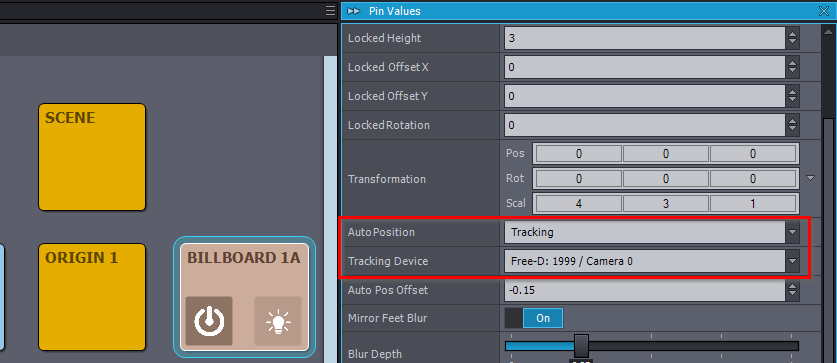
More on it here: https://aximmetry.com/learn/virtual-production-workflow/preparation-of-the-production-environment-phase-i/green-screen-production/tracked-camera-workflow/studio-control-panel/#talent-trk
This yellow square is the helper graphics:
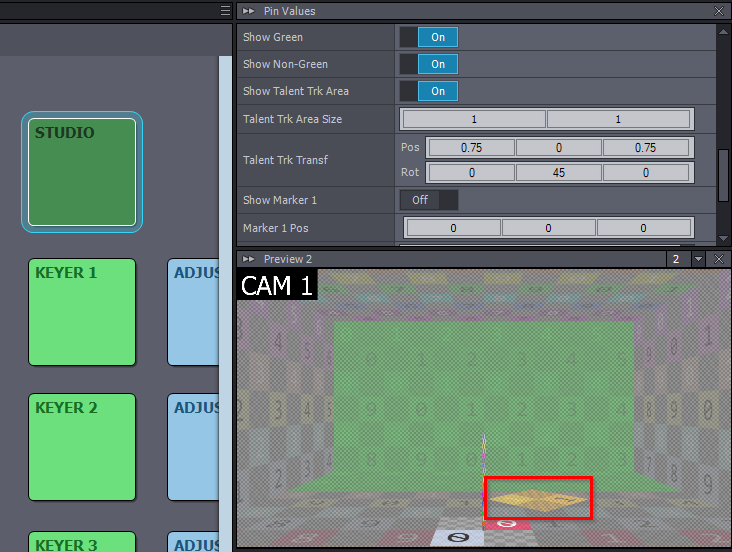
It won't affect anything in your setup.
And if you don't use talent tracking, or your talent tracking is done with the same tracking system as your camera, then you shouldn't use those Talent Trk pins.
Warmest regards,