JP
EN - English
CN - 中文
JP - 日本語
[LogWmfMedia] Tracks 000001F3A6A33E90: Format is not supported in D3D12.
The Virtual screen is not work. I don't know why?
Hi,
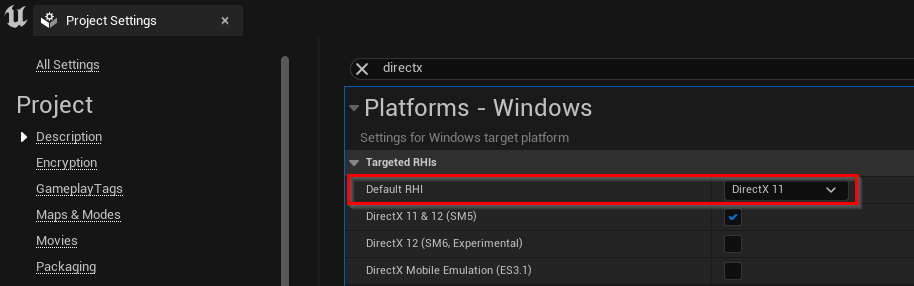
This is probably a limitation in Unreal 5, that Unreal 5 in DirectX12 can not playback your virtual screen's video format.I suspect this based on this forum thread: https://forums.unrealengine.com/t/media-textures-wont-display-video-in-ue5-preview-1-while-using-directx-12/503980 Your virtual screen will probably work if you target DirectX 11 in Unreal Project Settings:
Also, we suggest using Aximmetry to play the virtual screen's video: https://aximmetry.com/learn/tutorials/for-aximmetry-de-users/setting-up-a-virtual-screen-in-the-unreal-scene/ this way you shouldn't run into your error and you can use DirectX12. And this way Aximmetry provides several ways to modify and control your virtual screen's video.
Warmest regards,
アップロード中にエラーが発生しました。再試行してください。
Hi,
This is probably a limitation in Unreal 5, that Unreal 5 in DirectX12 can not playback your virtual screen's video format.
I suspect this based on this forum thread: https://forums.unrealengine.com/t/media-textures-wont-display-video-in-ue5-preview-1-while-using-directx-12/503980
Your virtual screen will probably work if you target DirectX 11 in Unreal Project Settings:
Also, we suggest using Aximmetry to play the virtual screen's video: https://aximmetry.com/learn/tutorials/for-aximmetry-de-users/setting-up-a-virtual-screen-in-the-unreal-scene/ this way you shouldn't run into your error and you can use DirectX12. And this way Aximmetry provides several ways to modify and control your virtual screen's video.
Warmest regards,