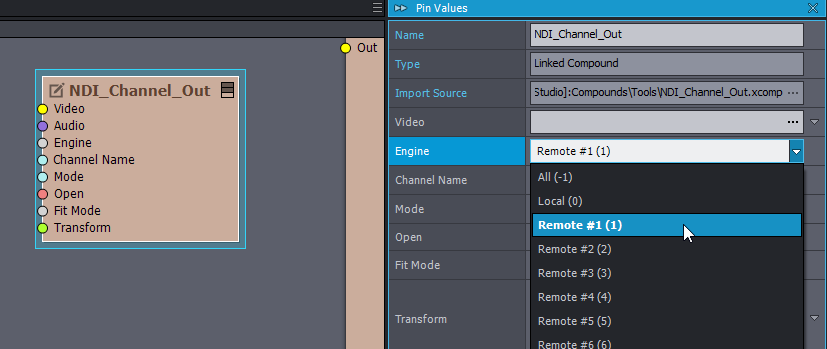
If you want to transmit the audio from the remote renderer to the controlling machine, then you can do it through NDI. You can use the [Common_Studio]:Compounds\Tools\NDI_Channel_Out.xcomp compound to easily set up such logic. Just specify your remote renderer at the Engine input pin:
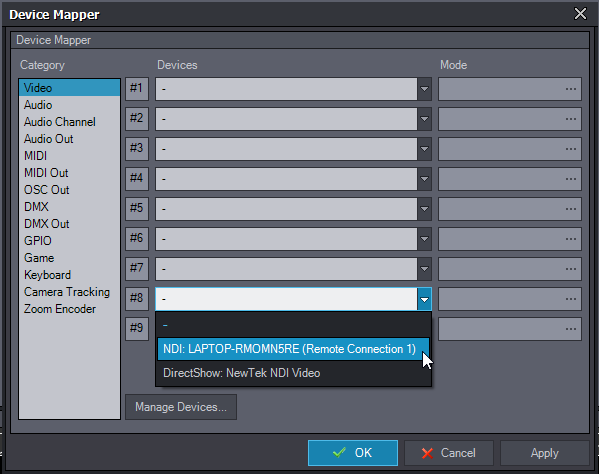
On the receiving end of the NDI (controller machine), map the NDI as Video at Edit->Device Mapper: And then you can easily select the NDI video where you need the audio coming from the remote renderer:
Hi Darren,
Yes, it is possible.
If you mean that the remote renderer should play the audio on a device connected to the remote renderer, then use the Renderer Config to set it up: https://aximmetry.com/learn/tutorials/for-studio-operators/setting-up-a-multi-machine-configuration/#renderer-config
If you want to transmit the audio from the remote renderer to the controlling machine, then you can do it through NDI. You can use the [Common_Studio]:Compounds\Tools\NDI_Channel_Out.xcomp compound to easily set up such logic. Just specify your remote renderer at the Engine input pin:
On the receiving end of the NDI (controller machine), map the NDI as Video at Edit->Device Mapper:
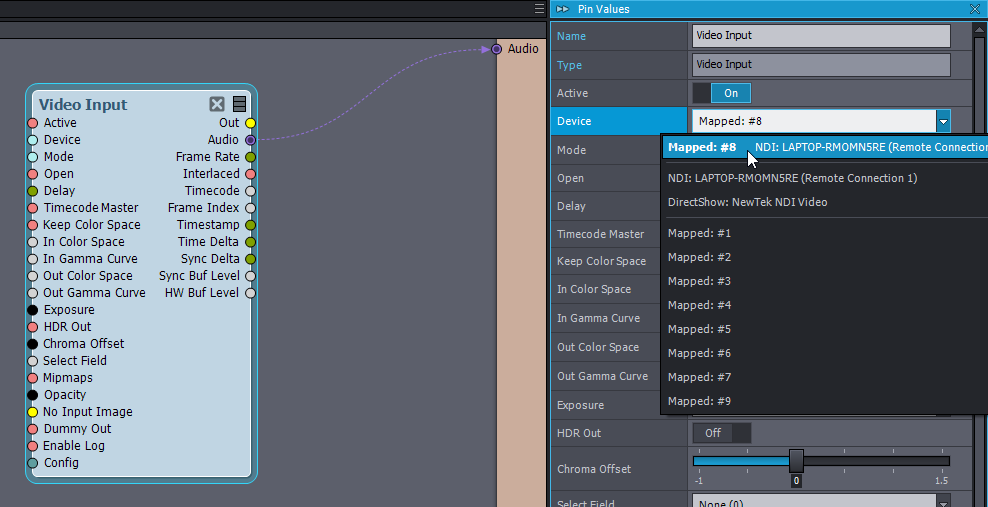
And then you can easily select the NDI video where you need the audio coming from the remote renderer:
Note, NDI is available for Broadcast and Professional licenses: https://aximmetry.com/products
Warmest regards,