Hi, i have an unreal sequence of dmx.. and i want to use he record node of aximmetry (because is to heavy to play in realtime) and in the record the sequence is out of sync (its faster) how can i solve it?
Unreal Sequence out of sync in the record
コメント
Pandora Studio
-
Have the same problem.
I have level sequence in my Unreals level that animates actor. When I setup Aximmetry for Offline Render in 25p and press Render button in Sequencer Aximmetry renders about 11-15 frames per one second. But sequence in Unreal still plays in realtime, so on rendered video actors movement that was driven but unreal's sequence is faster than it should.
Is there any way to syncronize Unreal animations with Aximmetry? Maybe I can send Time output from Sequencer to Unreal (as I made for audio track) and syncronize Level Sequence playback with it.
Eifert@Aximmetry
-
Hi Pandora,
This feature is on our request list, and we are planning to support it in the future, potentially through Unreal's Movie Render Queue.
In the meantime, you could try to ensure that the Level Sequence does not use system time. Instead, set it so that each frame advances according to your offline render frame rate's delta time. Theoretically, you should not need to transmit anything from Aximmetry to Unreal except the recording's frame rate.
Additionally, the System Params module provides information such as Frame ID and time, although this time is based on the system clock. The Video Recorder module, on the other hand, includes a Rec Time output pin, which should reflect the actual recording time.
It might work just to set the Sequence Display Rate to match your desired frame rate (and some additional settings in the Advanced Options, for example):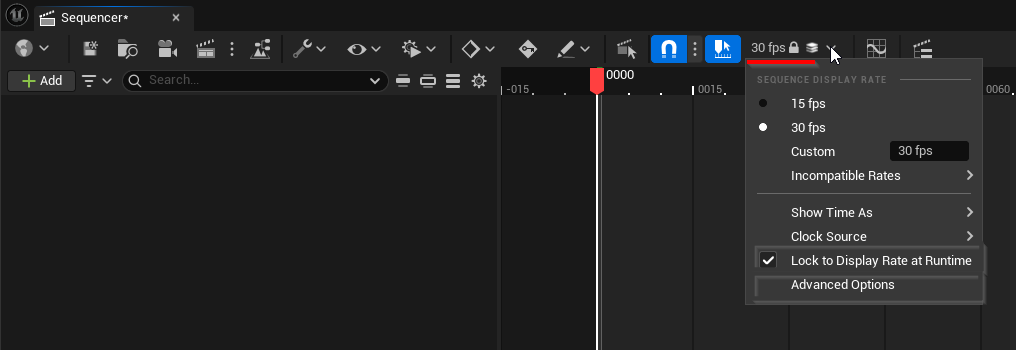
If you want, I can look into this in more detail.
Warmest regards,
Hi,
I'm not sure I understand it correctly, but I suspect the answer is the same as to you audio issue
https://my.aximmetry.com/post/1059-use-record-node-and-hear-the-audio